Prismic Chronicle - Complete Guide to The Page Builder
blog · prismic-chronicles-page-builder-2025
callout info
- title
A note on Slice Machine
- content
This post was published when Slice Machine was Prismic's recommended way to build. Today, you model slices with the Prismic CLI and Type Builder. Read how building with Prismic has changed.
- hidden_content
[]
text_content default
- content
Welcome to this month's Prismic Chronicle! We're trying something a little different this time around. Instead of our usual monthly feature spotlight, we're dedicating this entire Chronicle to the Page Builder and everything it can do.
Over the past year, we've been busy shipping new features and improvements that make building pages faster, more intuitive, and hopefully, more enjoyable. Whether you're new to Prismic or you've been with us for a while, there's probably something here you haven't discovered yet.
We'll walk through the complete Page Builder experience, from creating your first page to advanced features like AI translation and scheduled releases. Plus, we'll give you a sneak peek at some exciting collaboration features coming your way this quarter.
For a more step-by-step walkthrough of re-creating the Prismic homepage, check out the video below. Otherwise, keep reading for a full Page Builder overview! Let’s dive in! 👇
video default
- youtube_link
- https://www.youtube.com/watch?v=I0TMIEf0eic&t=1s
text_content default
- content
Getting started
Let’s get started with the basics by creating our first page!
Creating your first page
To begin, you can create a new page in your Prismic repository by clicking Create a new page and selecting your desired page type.

Once your page is created, you'll land directly in the Page Builder.
Page Builder overview
Here’s what you’ll see inside your new page:
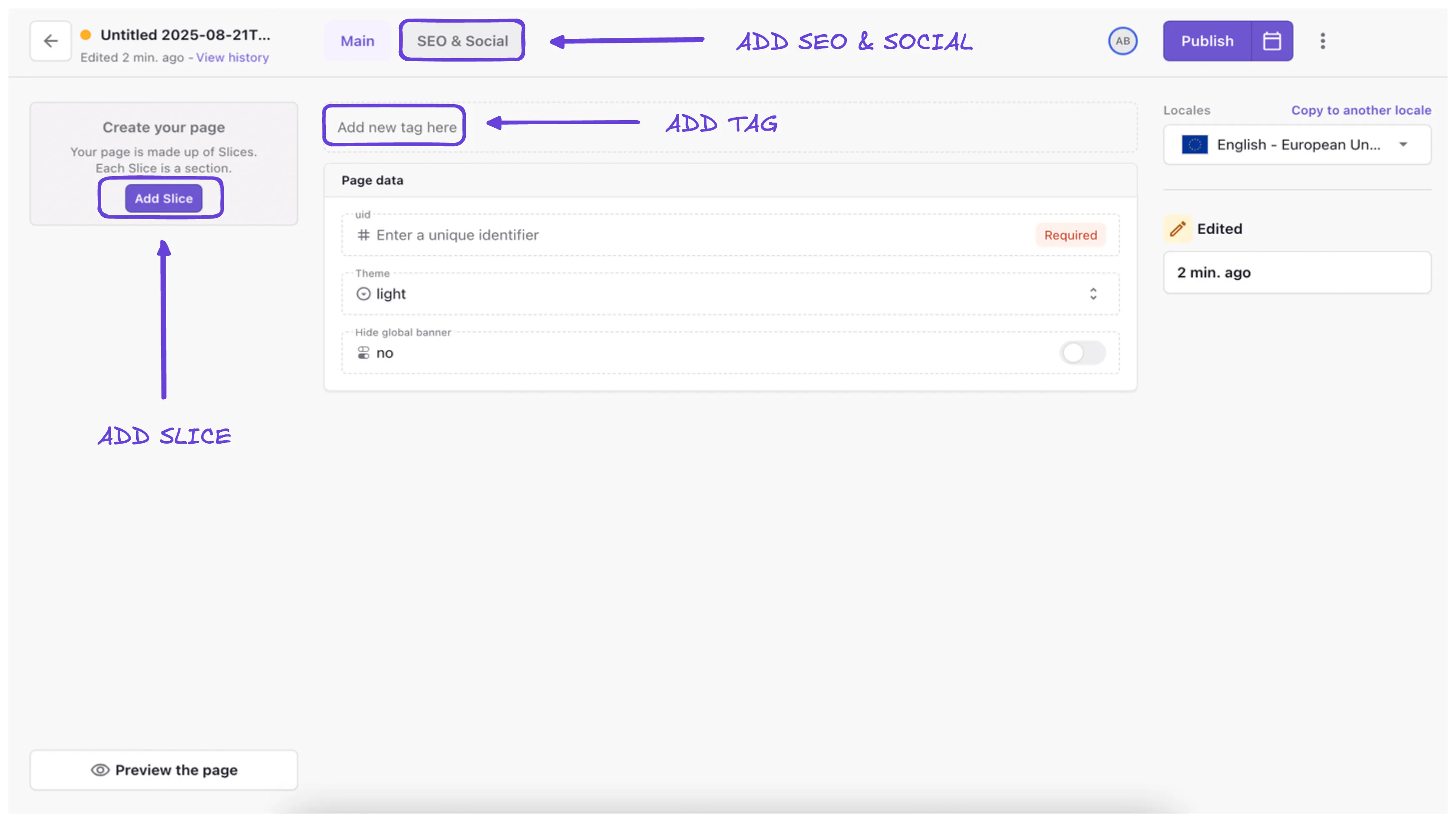
- Add Slice – opens the slice selector where you can choose from developer-built components.
- SEO & Social tab – configure metadata and preview how it looks in search and on social.
- Tags – categorize pages for easier filtering and search.
Before adding your first slice, it’s a good idea to set up a Live Preview. We’ll do that next!
Setting up live preview
Before adding content, it’s best to configure live preview so that you can see your changes in real-time. This feature dramatically improves your editing experience by showing exactly how your content will appear on the live website. To set up live preview:

- Click the three-dot menu in the upper-right corner
- Select "Live preview settings"
- Enter your website URL followed by "/slice-simulator" (e.g., https://yoursite.com/slice-simulator)
- Save the settings
With live preview enabled, any changes you make will appear instantly in your table of slices on the left.
text_content default
- content
Adding a slice (example: hero section)
Now that you're set up with live preview, it's time to start building your page with slices. Let's walk through adding a hero slice as our first example:

1. Click Add slice and choose Hero from the slice library.
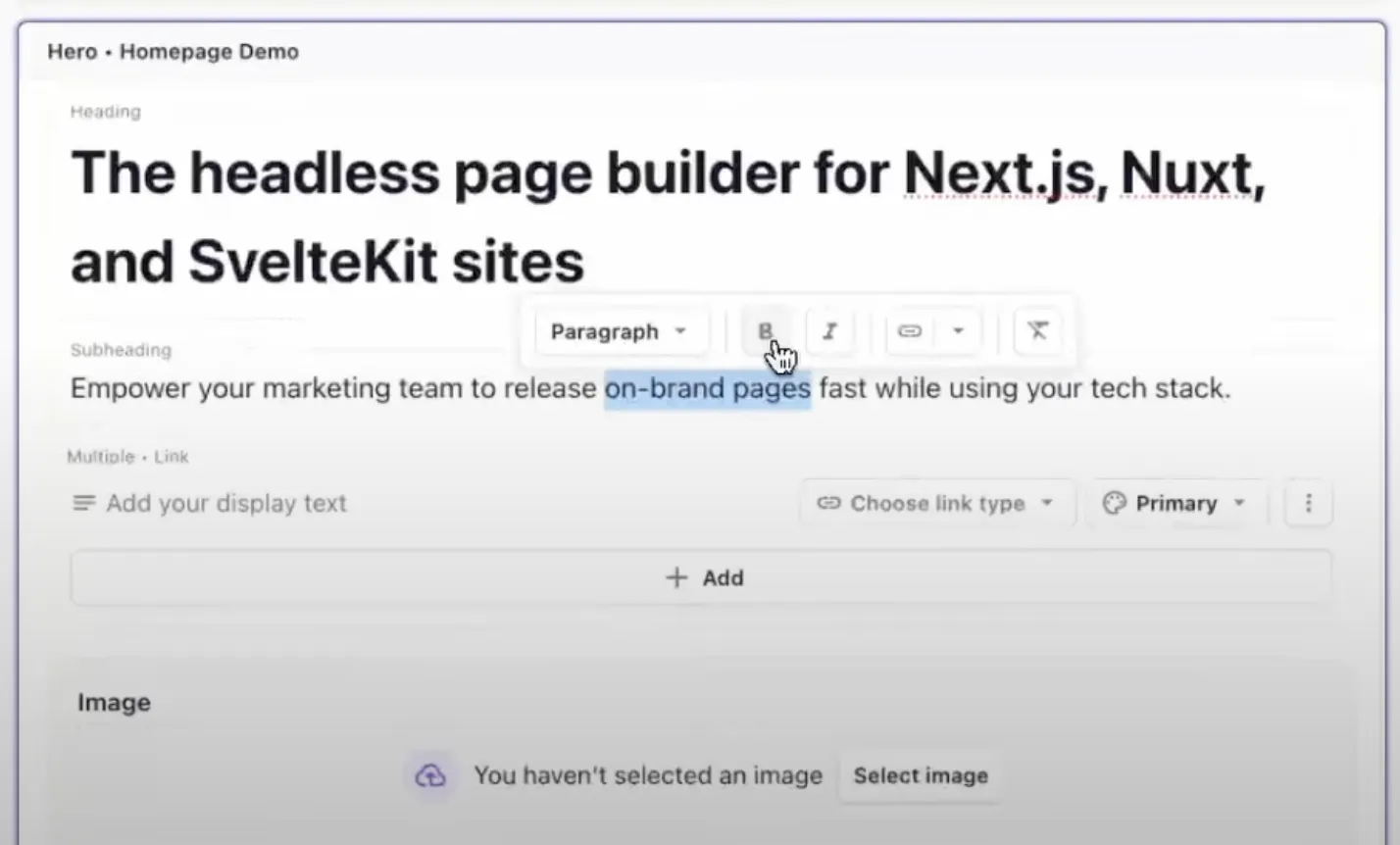
2. Add a heading and subheading (rich text allows bold, italics, bullet lists, etc. by highlighting the text and selecting your style).
3. Add CTAs using the link variants:
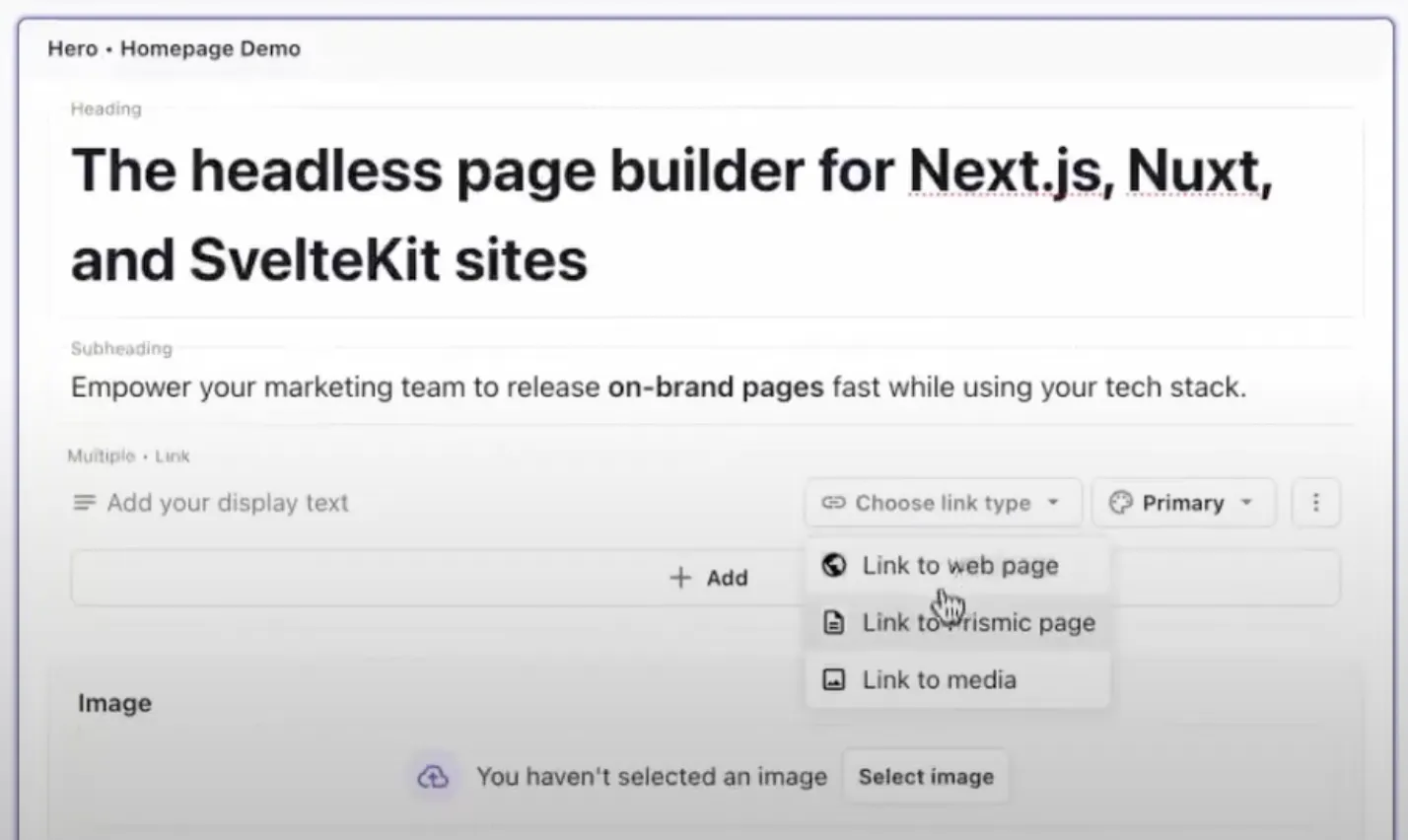
- Link to a webpage
- Link to a Prismic page
- Link to media (e.g., a video in your media library)
4. Upload and link a hero image (our enhanced media library allows you to easily search by tagged media or filter by media type or person who uploaded).

When you’re done adding your content to your slice, you should have a good idea of what it will look like in the table of slices on the left.
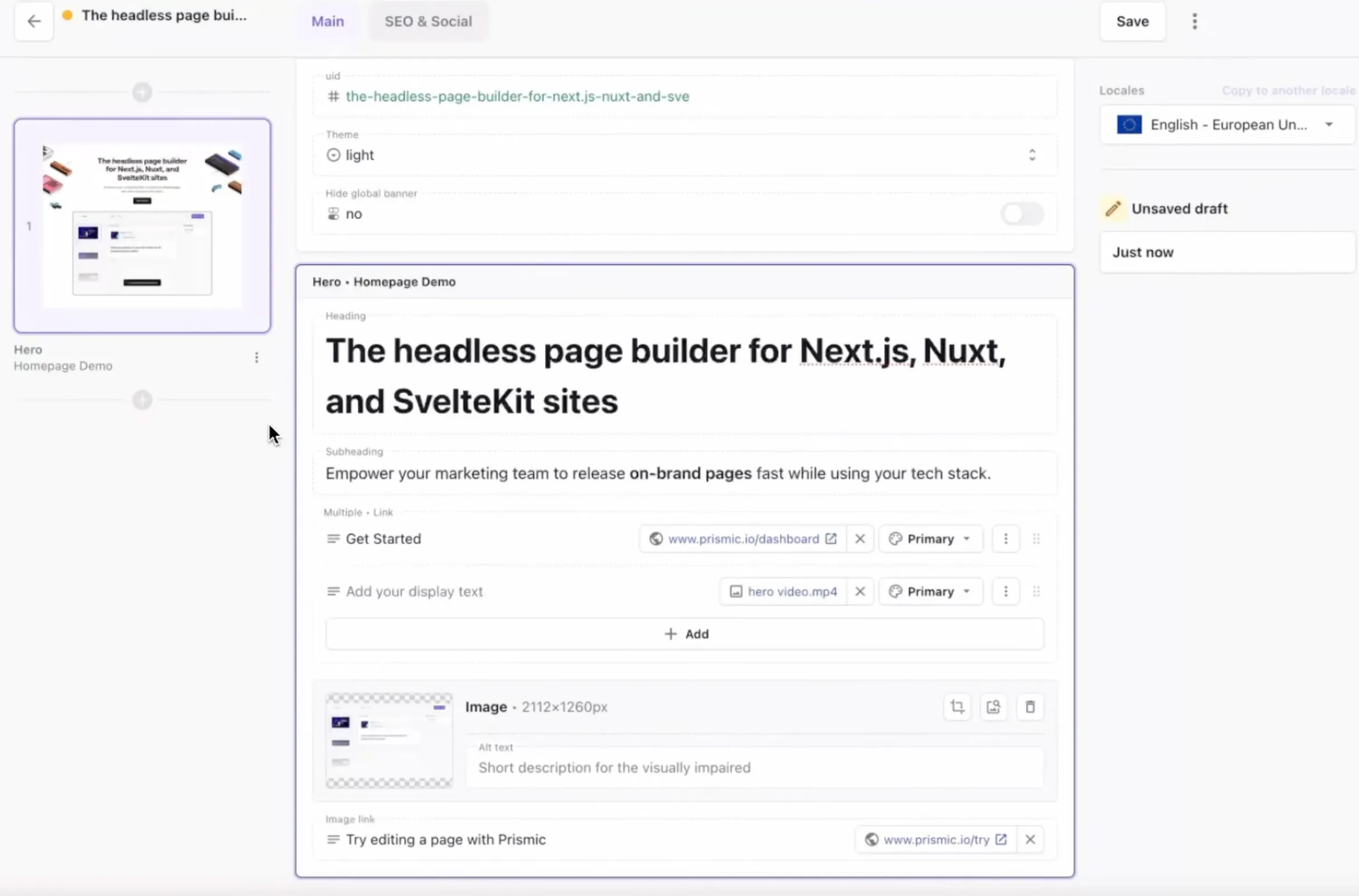
Now let’s take a look at some time-saving and page management features to keep your content organized.
blog_call_to_action default
- title
Increase your traffic and quality leads with Prismic!
- description
Join Prismic for free and start crafting pages that drive growth. Make and see changes in real-time with our visual Page Builder and quickly create on-brand pages that drive traffic and boost conversions!
- color
- blue
- image
- offset_image
- true
- cta_link
{ "link_type": "Web", "key": "c596526f-5087-4727-b83e-c162a3835f55", "url": "https://prismic.io/signup" }- cta_label
- Get started
- cta_type
- link
text_content default
- content
Page management and time-saving features
There are several features in the Page Builder that will help you work more efficiently and keep your content well-organized:
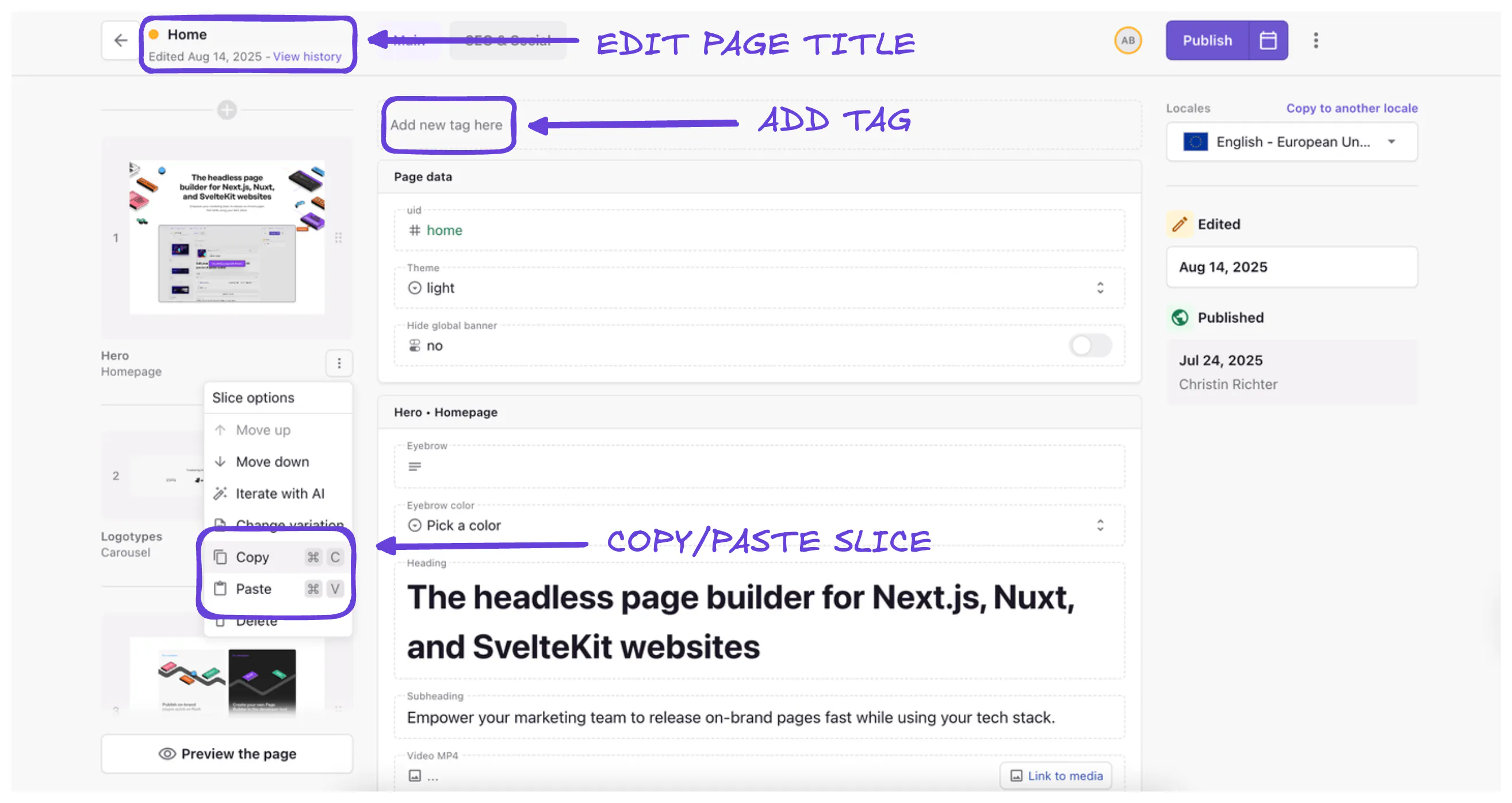
- Page Title – The title defaults to your first heading, but should be updated for clarity and repo searchability.
- Tags – Assign marketing, campaign, or functional tags to keep pages organized.
Copy & paste slices

Speed up your page creation process with our copy-paste feature for slices. Born from extensive user research, this tool gives marketers an even faster way to reuse slices with the content they’ve already perfected.
Whether you're reusing elements from your homepage, pricing page, or any other source, simply use Cmd + C (or click copy in the slice menu) to copy and Cmd + V (or click paste in the slice menu) to paste.
text_content default
- content
Optimizing with SEO & social metadata
It’s important not to forget about how your content will perform in search results and how it will appear if shared on social media. The SEO & Social tab lets you define:
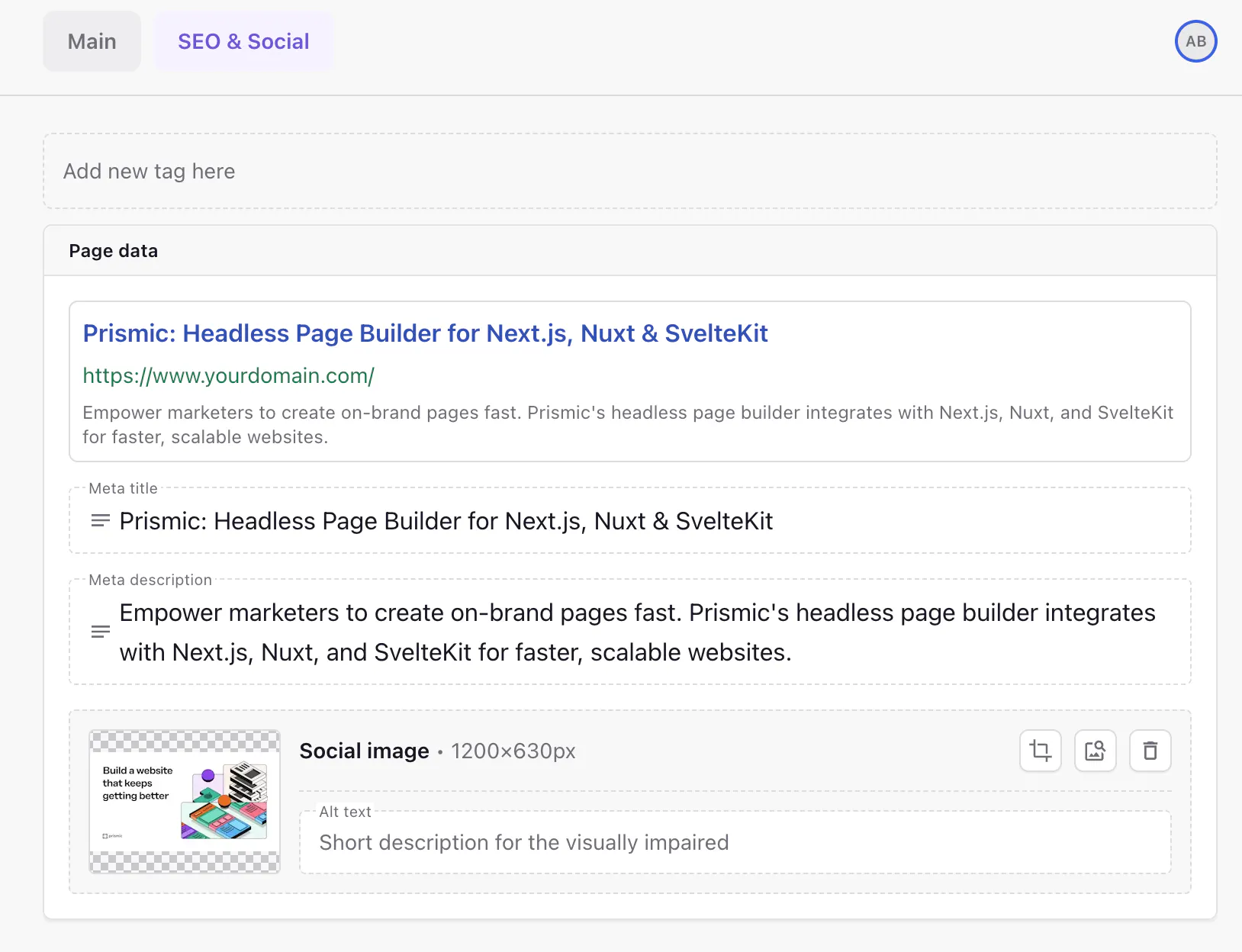
- Meta title (with character count guide).
- Meta description.
- Social image for sharing.
If fields are left blank or you need help with SEO metadata, our AI-powered SEO metadata assistant can auto-generate suggestions based on page content.
text_content default
- content
AI Translation & Glossary
For teams managing multilingual content, Prismic offers AI-powered translations that can significantly speed up your localization workflow.

This enables you to:
- Copy content into another locale (e.g., EN → FR).
- Use Translate with AI for instant translations.
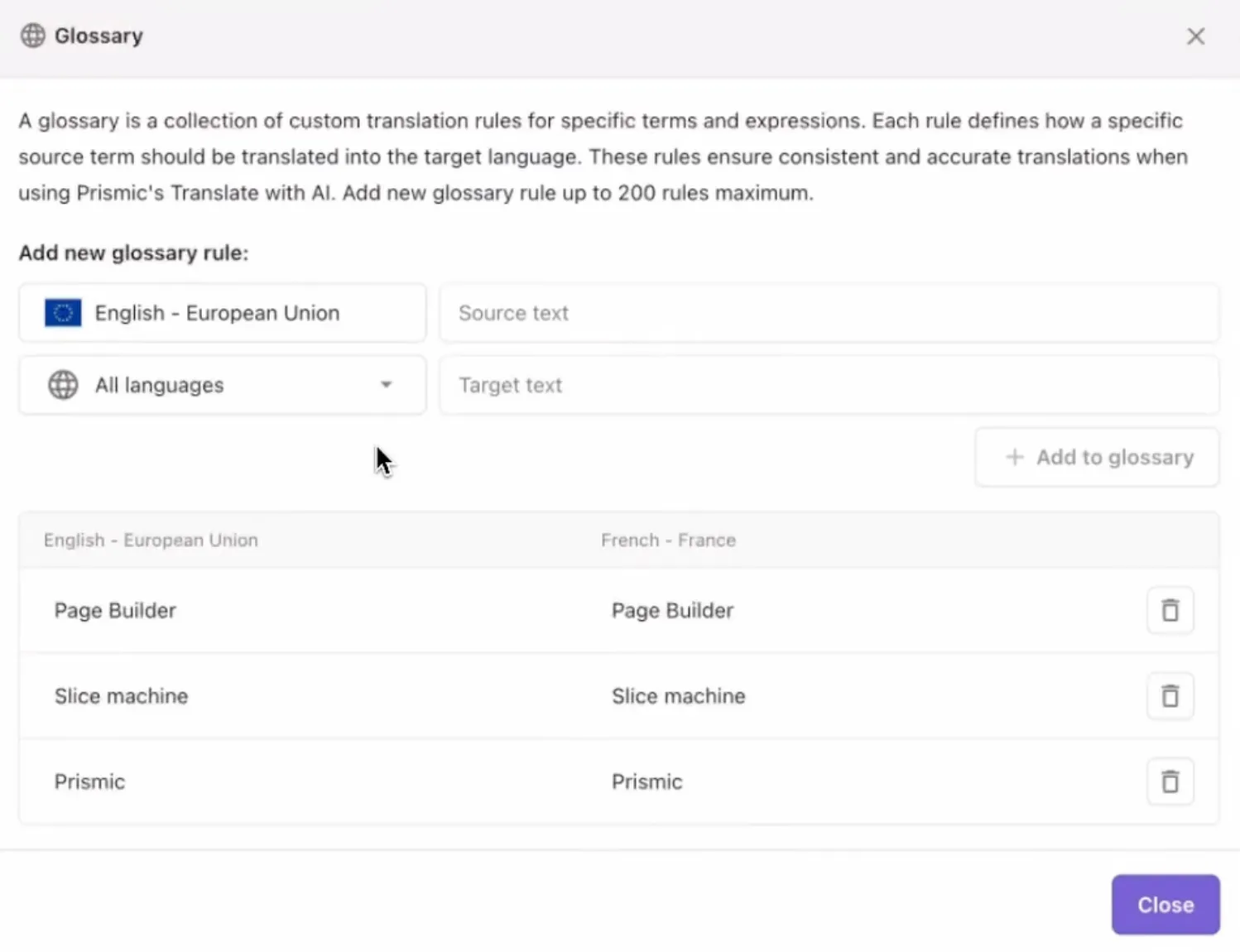
- Add Glossary terms to protect brand names or product names (e.g., keep “Slice Machine” untranslated).
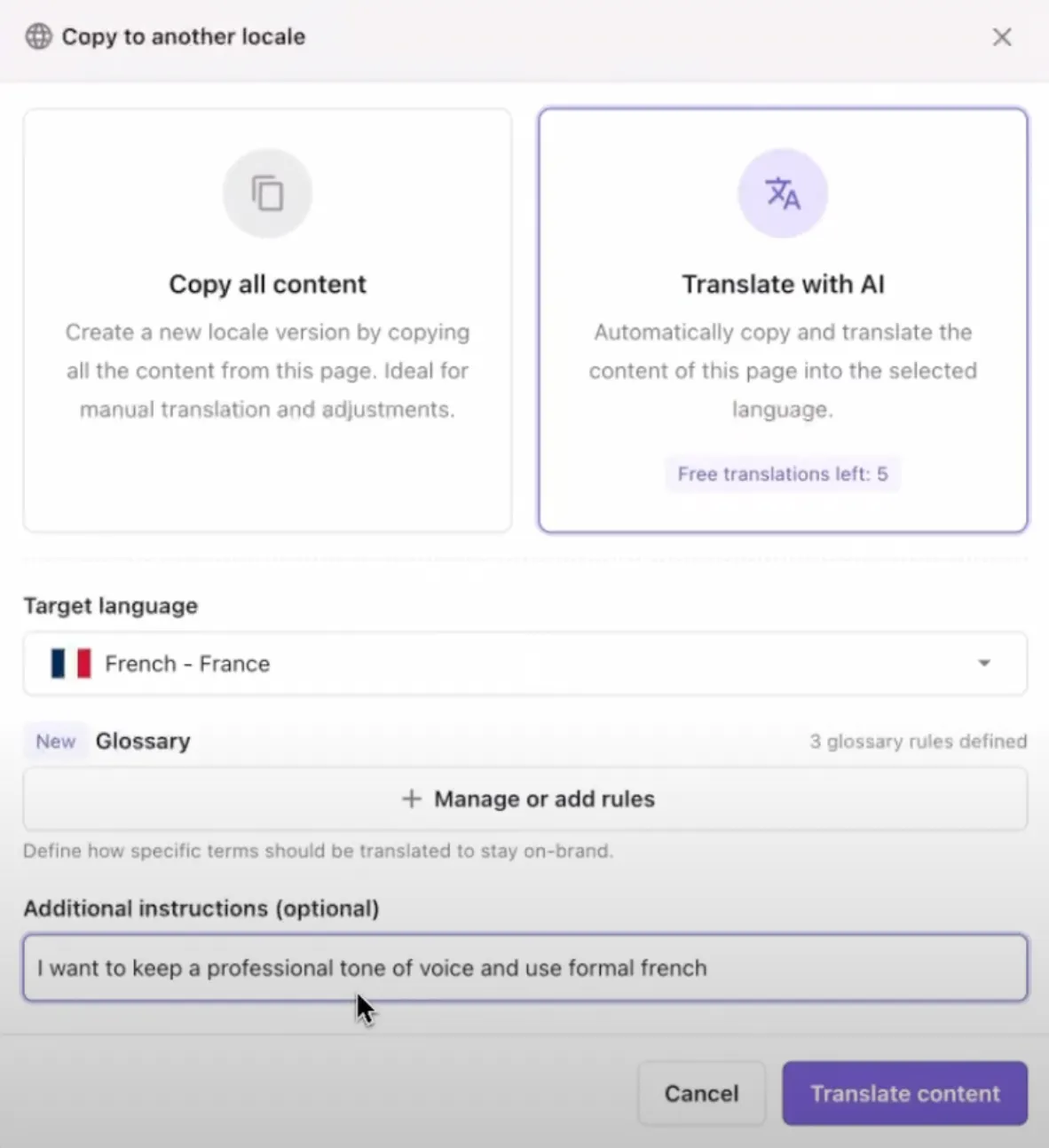
- Customize tone and formality (e.g., formal vs. casual).
text_content default
- content
Scheduling with Releases
Sometimes you need to coordinate multiple pages or plan content for future dates. That's where Releases come into play.

With Releases, you can prepare and schedule pages ahead of time:
- Group multiple pages into one release (e.g., “Summer Sale”).
- Schedule for a future date/time or publish immediately.
- Manage releases in the Planned tab.
text_content default
- content
Search & organization features
As your content library grows, finding the right pages quickly becomes essential. The Page Builder includes powerful search and organization tools to help.

In the Page builder, you can:
- Search by page name or UID.
- Filter by page type, tags, status (draft/published/archived), or author.
Spaces
For larger teams working on different types of content, Spaces provide an additional layer of organization.
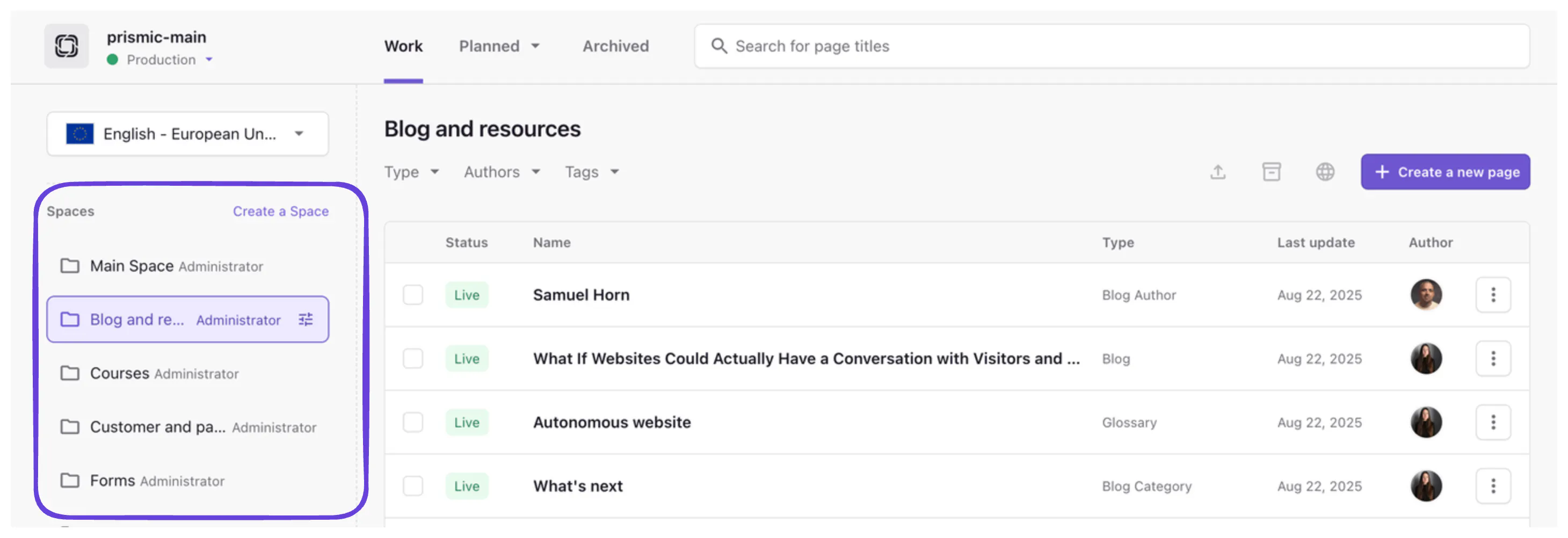
Spaces allow you to:
- Group content by team (e.g., Blog, Marketing).
- Collaborate more easily with larger teams.
Custom roles (Enterprise)
Enterprise customers can take organization a step further with granular permissions:
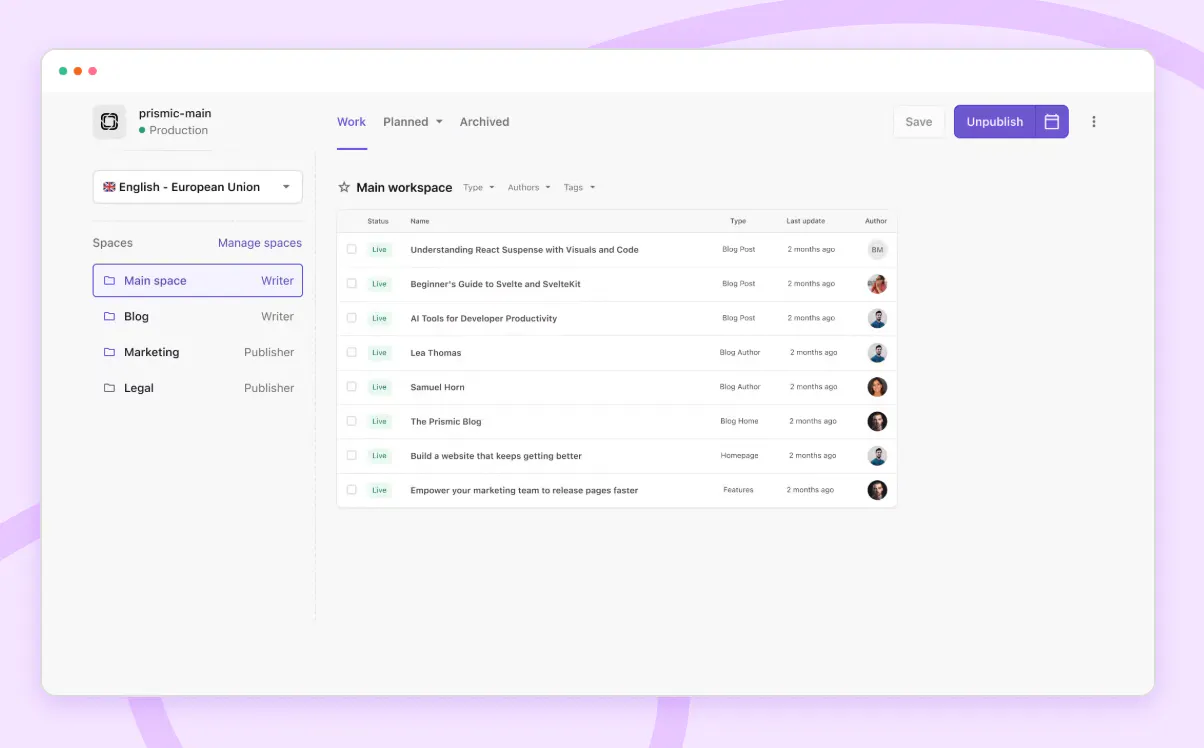
With custom roles you can:
- Set access rights per space.
- Example: The Blog team can publish blog pages, but only has read-only access to Marketing pages.
text_content default
- content
Real-time collaboration features (coming soon 👀)
We're not stopping here. Some exciting collaboration features are on the horizon that will make working together even smoother.

Here are some of the powerful real-time collaboration features, coming soon:
- Status indicators show who’s editing a field.
- Autosave ensures no work is lost.
- Future updates: commenting, notifications, and more.
text_content default
- content
Conclusion
The Page Builder offers a comprehensive set of tools essential for content management, from basic page creation to advanced features like AI translation and scheduled releases. We hope these features will help you create engaging, well-organized content while maintaining efficiency and team collaboration.
We will continue to improve the Page Builder with upcoming real-time collaboration features, making it the perfect solution for teams of all sizes. Whether you’re building a simple website or managing complete, multilingual sites, these features will provide you with the foundation for successful content management. Stay tuned for more updates!
related_posts default
- title
You might also like...
Document data
{
"title": [
{
"type": "heading1",
"text": "Prismic Chronicle - Complete Guide to The Page Builder",
"spans": [],
"direction": "ltr"
}
],
"image": {
"dimensions": {
"width": 517,
"height": 290
},
"alt": null,
"copyright": null,
"url": "https://prismic-main.cdn.prismic.io/prismic-main/aLgy0mGNHVfTOj8t_chronicle.svg",
"id": "aLgy0mGNHVfTOj8t",
"edit": {
"x": 0,
"y": 0,
"zoom": 1,
"background": "transparent"
}
},
"author": {
"id": "ZQBwDxEAADsEL3ts",
"type": "blog_author",
"tags": [],
"lang": "en-eu",
"slug": "-",
"first_publication_date": "2023-09-12T14:05:35+0000",
"last_publication_date": "2024-05-02T09:38:32+0000",
"uid": "guy-proops",
"link_type": "Document",
"key": "9114a45d-5053-4e0f-a34c-35c24d6b55f1",
"isBroken": false
},
"additional_author": {
"link_type": "Document"
},
"category": {
"id": "agtaYxIAACoAHp5o",
"type": "blog_category",
"tags": [],
"lang": "en-eu",
"slug": "product-news",
"first_publication_date": "2026-05-18T18:59:35+0000",
"last_publication_date": "2026-05-18T18:59:35+0000",
"uid": "product-news",
"link_type": "Document",
"key": "04ae02c8-495e-40db-89da-97db3c3edab9",
"isBroken": false
},
"date": "2025-09-03",
"updated_date": null,
"learning_objective": null,
"card_description": [],
"slices": [
{
"variation": "info",
"version": "sktwi1xtmkfgx8626",
"items": [],
"primary": {
"title": [
{
"type": "heading2",
"text": "A note on Slice Machine",
"spans": [],
"direction": "ltr"
}
],
"content": [
{
"type": "paragraph",
"text": "This post was published when Slice Machine was Prismic's recommended way to build. Today, you model slices with the Prismic CLI and Type Builder. Read how building with Prismic has changed.",
"spans": [
{
"start": 146,
"end": 188,
"type": "hyperlink",
"data": {
"link_type": "Web",
"url": "https://prismic.io/blog/how-building-with-prismic-is-changing",
"target": "_blank"
}
}
],
"direction": "ltr"
}
],
"hidden_content": []
},
"id": "callout$d56841d2-b68e-483c-b1f0-5f1e1be08a04",
"slice_type": "callout",
"slice_label": null
},
{
"variation": "default",
"version": "sktwi1xtmkfgx8626",
"items": [],
"primary": {
"content": [
{
"type": "paragraph",
"text": "Welcome to this month's Prismic Chronicle! We're trying something a little different this time around. Instead of our usual monthly feature spotlight, we're dedicating this entire Chronicle to the Page Builder and everything it can do.",
"spans": [],
"direction": "ltr"
},
{
"type": "paragraph",
"text": "Over the past year, we've been busy shipping new features and improvements that make building pages faster, more intuitive, and hopefully, more enjoyable. Whether you're new to Prismic or you've been with us for a while, there's probably something here you haven't discovered yet.",
"spans": [],
"direction": "ltr"
},
{
"type": "paragraph",
"text": "We'll walk through the complete Page Builder experience, from creating your first page to advanced features like AI translation and scheduled releases. Plus, we'll give you a sneak peek at some exciting collaboration features coming your way this quarter.",
"spans": [],
"direction": "ltr"
},
{
"type": "paragraph",
"text": "For a more step-by-step walkthrough of re-creating the Prismic homepage, check out the video below. Otherwise, keep reading for a full Page Builder overview! Let’s dive in! 👇",
"spans": [],
"direction": "ltr"
}
]
},
"id": "text_content$e868c4ef-93ee-49ad-bec0-6e47b90494ed",
"slice_type": "text_content",
"slice_label": null
},
{
"variation": "default",
"version": "sktwi1xtmkfgx8626",
"items": [],
"primary": {
"youtube_link": "https://www.youtube.com/watch?v=I0TMIEf0eic&t=1s"
},
"id": "video$5fba3702-e225-4f37-bc79-4c32df0ad831",
"slice_type": "video",
"slice_label": null
},
{
"variation": "default",
"version": "sktwi1xtmkfgx8626",
"items": [],
"primary": {
"content": [
{
"type": "heading2",
"text": "Getting started",
"spans": [],
"direction": "ltr"
},
{
"type": "paragraph",
"text": "Let’s get started with the basics by creating our first page!",
"spans": [],
"direction": "ltr"
},
{
"type": "heading3",
"text": "Creating your first page",
"spans": [],
"direction": "ltr"
},
{
"type": "paragraph",
"text": "To begin, you can create a new page in your Prismic repository by clicking Create a new page and selecting your desired page type.",
"spans": [
{
"start": 75,
"end": 92,
"type": "strong"
}
],
"direction": "ltr"
},
{
"type": "image",
"url": "https://images.prismic.io/prismic-main/aLgnnmGNHVfTOj1K_Create.gif?auto=format,compress",
"alt": "Gif of creating a page in the Page Builder",
"copyright": null,
"dimensions": {
"width": 1288,
"height": 720
},
"id": "aLgnnmGNHVfTOj1K",
"edit": {
"x": 0,
"y": 0,
"zoom": 1,
"background": "transparent"
}
},
{
"type": "paragraph",
"text": "Once your page is created, you'll land directly in the Page Builder.",
"spans": [],
"direction": "ltr"
},
{
"type": "heading3",
"text": "Page Builder overview",
"spans": [],
"direction": "ltr"
},
{
"type": "paragraph",
"text": "Here’s what you’ll see inside your new page:",
"spans": [],
"direction": "ltr"
},
{
"type": "image",
"url": "https://images.prismic.io/prismic-main/aLgn82GNHVfTOj1d_overview.png?auto=format,compress",
"alt": "An image of the Page Builder overview",
"copyright": null,
"dimensions": {
"width": 3454,
"height": 1951
},
"id": "aLgn82GNHVfTOj1d",
"edit": {
"x": 0,
"y": 0,
"zoom": 1,
"background": "transparent"
}
},
{
"type": "list-item",
"text": "Add Slice – opens the slice selector where you can choose from developer-built components.",
"spans": [
{
"start": 0,
"end": 9,
"type": "strong"
}
],
"direction": "ltr"
},
{
"type": "list-item",
"text": "SEO & Social tab – configure metadata and preview how it looks in search and on social.",
"spans": [
{
"start": 0,
"end": 16,
"type": "strong"
}
],
"direction": "ltr"
},
{
"type": "list-item",
"text": "Tags – categorize pages for easier filtering and search.",
"spans": [
{
"start": 0,
"end": 4,
"type": "strong"
}
],
"direction": "ltr"
},
{
"type": "paragraph",
"text": "Before adding your first slice, it’s a good idea to set up a Live Preview. We’ll do that next!",
"spans": [
{
"start": 61,
"end": 73,
"type": "strong"
}
],
"direction": "ltr"
},
{
"type": "heading3",
"text": "Setting up live preview",
"spans": [],
"direction": "ltr"
},
{
"type": "paragraph",
"text": "Before adding content, it’s best to configure live preview so that you can see your changes in real-time. This feature dramatically improves your editing experience by showing exactly how your content will appear on the live website. To set up live preview:",
"spans": [],
"direction": "ltr"
},
{
"type": "image",
"url": "https://images.prismic.io/prismic-main/aLgoRWGNHVfTOj1l_LivePreview.gif?auto=format,compress",
"alt": "A GIF showing how to set up Live Preview",
"copyright": null,
"dimensions": {
"width": 1288,
"height": 720
},
"id": "aLgoRWGNHVfTOj1l",
"edit": {
"x": 0,
"y": 0,
"zoom": 1,
"background": "transparent"
}
},
{
"type": "o-list-item",
"text": "Click the three-dot menu in the upper-right corner",
"spans": [],
"direction": "ltr"
},
{
"type": "o-list-item",
"text": "Select \"Live preview settings\"",
"spans": [],
"direction": "ltr"
},
{
"type": "o-list-item",
"text": "Enter your website URL followed by \"/slice-simulator\" (e.g., https://yoursite.com/slice-simulator)",
"spans": [
{
"start": 61,
"end": 97,
"type": "label",
"data": {
"label": "inline-code"
}
}
],
"direction": "ltr"
},
{
"type": "o-list-item",
"text": "Save the settings",
"spans": [],
"direction": "ltr"
},
{
"type": "paragraph",
"text": "With live preview enabled, any changes you make will appear instantly in your table of slices on the left.",
"spans": [],
"direction": "ltr"
}
]
},
"id": "text_content$76bbcc63-dbab-4c00-8d5f-d43ff4984a9a",
"slice_type": "text_content",
"slice_label": null
},
{
"variation": "default",
"version": "sktwi1xtmkfgx8626",
"items": [],
"primary": {
"content": [
{
"type": "heading2",
"text": "Adding a slice (example: hero section)",
"spans": [],
"direction": "ltr"
},
{
"type": "paragraph",
"text": "Now that you're set up with live preview, it's time to start building your page with slices. Let's walk through adding a hero slice as our first example:",
"spans": [
{
"start": 121,
"end": 125,
"type": "hyperlink",
"data": {
"link_type": "Web",
"url": "https://prismic.io/blog/website-hero-section",
"target": "_blank"
}
},
{
"start": 126,
"end": 131,
"type": "strong"
}
],
"direction": "ltr"
},
{
"type": "image",
"url": "https://images.prismic.io/prismic-main/aLgop2GNHVfTOj14_AddSlice.gif?auto=format,compress",
"alt": "A GIF showing how to add a slice",
"copyright": null,
"dimensions": {
"width": 1288,
"height": 720
},
"id": "aLgop2GNHVfTOj14",
"edit": {
"x": 0,
"y": 0,
"zoom": 1,
"background": "transparent"
}
},
{
"type": "paragraph",
"text": "1. Click Add slice and choose Hero from the slice library.",
"spans": [
{
"start": 9,
"end": 18,
"type": "strong"
},
{
"start": 30,
"end": 34,
"type": "strong"
}
],
"direction": "ltr"
},
{
"type": "paragraph",
"text": "2. Add a heading and subheading (rich text allows bold, italics, bullet lists, etc. by highlighting the text and selecting your style).",
"spans": [],
"direction": "ltr"
},
{
"type": "image",
"url": "https://images.prismic.io/prismic-main/aLgo8mGNHVfTOj1__label.png?auto=format,compress",
"alt": "An image of adding a label in the Page Builder",
"copyright": null,
"dimensions": {
"width": 1428,
"height": 862
},
"id": "aLgo8mGNHVfTOj1_",
"edit": {
"x": 0,
"y": 0,
"zoom": 1,
"background": "transparent"
}
},
{
"type": "paragraph",
"text": "3. Add CTAs using the link variants:",
"spans": [
{
"start": 7,
"end": 11,
"type": "hyperlink",
"data": {
"link_type": "Web",
"url": "https://prismic.io/blog/call-to-action-examples",
"target": "_blank"
}
},
{
"start": 23,
"end": 35,
"type": "strong"
}
],
"direction": "ltr"
},
{
"type": "image",
"url": "https://images.prismic.io/prismic-main/aLgpO2GNHVfTOj2T_LinkVariants.png?auto=format,compress",
"alt": "An image of how to add link variants in the Page Builder",
"copyright": null,
"dimensions": {
"width": 1428,
"height": 852
},
"id": "aLgpO2GNHVfTOj2T",
"edit": {
"x": 0,
"y": 0,
"zoom": 1,
"background": "transparent"
}
},
{
"type": "list-item",
"text": "Link to a webpage",
"spans": [],
"direction": "ltr"
},
{
"type": "list-item",
"text": "Link to a Prismic page",
"spans": [],
"direction": "ltr"
},
{
"type": "list-item",
"text": "Link to media (e.g., a video in your media library)",
"spans": [],
"direction": "ltr"
},
{
"type": "paragraph",
"text": "4. Upload and link a hero image (our enhanced media library allows you to easily search by tagged media or filter by media type or person who uploaded).",
"spans": [],
"direction": "ltr"
},
{
"type": "image",
"url": "https://images.prismic.io/prismic-main/aLgpnGGNHVfTOj2j_Filter.gif?auto=format,compress",
"alt": "An image of filtering assets in the media library",
"copyright": null,
"dimensions": {
"width": 1252,
"height": 720
},
"id": "aLgpnGGNHVfTOj2j",
"edit": {
"x": 0,
"y": 0,
"zoom": 1,
"background": "transparent"
}
},
{
"type": "paragraph",
"text": "When you’re done adding your content to your slice, you should have a good idea of what it will look like in the table of slices on the left.",
"spans": [],
"direction": "ltr"
},
{
"type": "image",
"url": "https://images.prismic.io/prismic-main/aLgqJ2GNHVfTOj26_Page.png?auto=format,compress",
"alt": "An image of a filled out slice in the Page Builder",
"copyright": null,
"dimensions": {
"width": 2436,
"height": 1606
},
"id": "aLgqJ2GNHVfTOj26",
"edit": {
"x": 0,
"y": 0,
"zoom": 1,
"background": "transparent"
}
},
{
"type": "paragraph",
"text": "Now let’s take a look at some time-saving and page management features to keep your content organized.",
"spans": [],
"direction": "ltr"
}
]
},
"id": "text_content$3c6b1343-658f-4109-a730-54d0d6697c39",
"slice_type": "text_content",
"slice_label": null
},
{
"variation": "default",
"version": "initial",
"items": [],
"primary": {
"title": [
{
"type": "heading2",
"text": "Increase your traffic and quality leads with Prismic!",
"spans": [],
"direction": "ltr"
}
],
"description": [
{
"type": "paragraph",
"text": "Join Prismic for free and start crafting pages that drive growth. Make and see changes in real-time with our visual Page Builder and quickly create on-brand pages that drive traffic and boost conversions!",
"spans": [],
"direction": "ltr"
}
],
"color": "blue",
"image": {
"dimensions": {
"width": 527,
"height": 298
},
"alt": null,
"copyright": null,
"url": "https://prismic-main.cdn.prismic.io/prismic-main/e5928876-50cb-4f41-b44e-8d79ecc59876_cta_image.svg",
"id": "ZZ3vwBIAACwADCb_",
"edit": {
"x": 0,
"y": 0,
"zoom": 1,
"background": "transparent"
}
},
"offset_image": true,
"cta_link": {
"link_type": "Web",
"key": "c596526f-5087-4727-b83e-c162a3835f55",
"url": "https://prismic.io/signup"
},
"cta_label": "Get started",
"cta_type": "link"
},
"id": "blog_call_to_action$1c603303-5caa-4703-add7-69a671998f87",
"slice_type": "blog_call_to_action",
"slice_label": null
},
{
"variation": "default",
"version": "sktwi1xtmkfgx8626",
"items": [],
"primary": {
"content": [
{
"type": "heading2",
"text": "Page management and time-saving features",
"spans": [],
"direction": "ltr"
},
{
"type": "paragraph",
"text": "There are several features in the Page Builder that will help you work more efficiently and keep your content well-organized:",
"spans": [],
"direction": "ltr"
},
{
"type": "image",
"url": "https://images.prismic.io/prismic-main/aLgrgmGNHVfTOj3u_title_tag_copy.png?auto=format,compress",
"alt": "An image of features in the Page Builder",
"copyright": null,
"dimensions": {
"width": 2629,
"height": 1396
},
"id": "aLgrgmGNHVfTOj3u",
"edit": {
"x": 0,
"y": 0,
"zoom": 1,
"background": "transparent"
}
},
{
"type": "list-item",
"text": "Page Title – The title defaults to your first heading, but should be updated for clarity and repo searchability.",
"spans": [
{
"start": 0,
"end": 10,
"type": "strong"
}
],
"direction": "ltr"
},
{
"type": "list-item",
"text": "Tags – Assign marketing, campaign, or functional tags to keep pages organized.",
"spans": [
{
"start": 0,
"end": 4,
"type": "strong"
}
],
"direction": "ltr"
},
{
"type": "heading3",
"text": "Copy & paste slices",
"spans": [],
"direction": "ltr"
},
{
"type": "image",
"url": "https://images.prismic.io/prismic-main/aLguCWGNHVfTOj5V_CopyPaste.gif?auto=format,compress",
"alt": "A GIF of copying and pasting a slice",
"copyright": null,
"dimensions": {
"width": 1244,
"height": 720
},
"id": "aLguCWGNHVfTOj5V",
"edit": {
"x": 0,
"y": 0,
"zoom": 1,
"background": "transparent"
}
},
{
"type": "paragraph",
"text": "Speed up your page creation process with our copy-paste feature for slices. Born from extensive user research, this tool gives marketers an even faster way to reuse slices with the content they’ve already perfected.",
"spans": [
{
"start": 45,
"end": 74,
"type": "hyperlink",
"data": {
"link_type": "Web",
"url": "https://prismic.io/updates/copy-paste-slices",
"target": "_blank"
}
}
],
"direction": "ltr"
},
{
"type": "paragraph",
"text": "Whether you're reusing elements from your homepage, pricing page, or any other source, simply use Cmd + C (or click copy in the slice menu) to copy and Cmd + V (or click paste in the slice menu) to paste.",
"spans": [],
"direction": "ltr"
}
]
},
"id": "text_content$79f5ecda-0024-4fda-8406-8ad37ea99666",
"slice_type": "text_content",
"slice_label": null
},
{
"variation": "default",
"version": "sktwi1xtmkfgx8626",
"items": [],
"primary": {
"content": [
{
"type": "heading2",
"text": "Optimizing with SEO & social metadata",
"spans": [],
"direction": "ltr"
},
{
"type": "paragraph",
"text": "It’s important not to forget about how your content will perform in search results and how it will appear if shared on social media. The SEO & Social tab lets you define:",
"spans": [
{
"start": 137,
"end": 153,
"type": "strong"
}
],
"direction": "ltr"
},
{
"type": "image",
"url": "https://images.prismic.io/prismic-main/aLgv02GNHVfTOj6u_seo_social.png?auto=format,compress",
"alt": "An image of seo and social tab in the page builder",
"copyright": null,
"dimensions": {
"width": 1628,
"height": 1248
},
"id": "aLgv02GNHVfTOj6u",
"edit": {
"x": 0,
"y": 0,
"zoom": 1,
"background": "transparent"
}
},
{
"type": "list-item",
"text": "Meta title (with character count guide).",
"spans": [
{
"start": 0,
"end": 10,
"type": "strong"
}
],
"direction": "ltr"
},
{
"type": "list-item",
"text": "Meta description.",
"spans": [
{
"start": 0,
"end": 16,
"type": "strong"
}
],
"direction": "ltr"
},
{
"type": "list-item",
"text": "Social image for sharing.",
"spans": [
{
"start": 0,
"end": 12,
"type": "strong"
}
],
"direction": "ltr"
},
{
"type": "paragraph",
"text": "If fields are left blank or you need help with SEO metadata, our AI-powered SEO metadata assistant can auto-generate suggestions based on page content.",
"spans": [
{
"start": 76,
"end": 98,
"type": "hyperlink",
"data": {
"link_type": "Web",
"url": "https://prismic.io/updates/seo-metadata-assistant",
"target": "_blank"
}
}
],
"direction": "ltr"
},
{
"type": "image",
"url": "https://images.prismic.io/prismic-main/aLgwIGGNHVfTOj64_SEO.gif?auto=format,compress",
"alt": "A GIF of SEO and Social tab in the Page Builder",
"copyright": null,
"dimensions": {
"width": 1116,
"height": 720
},
"id": "aLgwIGGNHVfTOj64",
"edit": {
"x": 0,
"y": 0,
"zoom": 1,
"background": "transparent"
}
}
]
},
"id": "text_content$8e844f28-47d6-4514-9a12-a2cfa354d82d",
"slice_type": "text_content",
"slice_label": null
},
{
"variation": "default",
"version": "sktwi1xtmkfgx8626",
"items": [],
"primary": {
"content": [
{
"type": "heading2",
"text": "AI Translation & Glossary",
"spans": [],
"direction": "ltr"
},
{
"type": "paragraph",
"text": "For teams managing multilingual content, Prismic offers AI-powered translations that can significantly speed up your localization workflow.",
"spans": [
{
"start": 56,
"end": 79,
"type": "strong"
},
{
"start": 117,
"end": 129,
"type": "hyperlink",
"data": {
"link_type": "Web",
"url": "https://prismic.io/features/localization",
"target": "_blank"
}
}
],
"direction": "ltr"
},
{
"type": "image",
"url": "https://images.prismic.io/prismic-main/aLgwXGGNHVfTOj7A_Translation.gif?auto=format,compress",
"alt": "A GIF of AI Translation feature in the Page Builder",
"copyright": null,
"dimensions": {
"width": 1264,
"height": 720
},
"id": "aLgwXGGNHVfTOj7A",
"edit": {
"x": 0,
"y": 0,
"zoom": 1,
"background": "transparent"
}
},
{
"type": "paragraph",
"text": "This enables you to:",
"spans": [],
"direction": "ltr"
},
{
"type": "list-item",
"text": "Copy content into another locale (e.g., EN → FR).",
"spans": [],
"direction": "ltr"
},
{
"type": "list-item",
"text": "Use Translate with AI for instant translations.",
"spans": [
{
"start": 4,
"end": 21,
"type": "hyperlink",
"data": {
"link_type": "Web",
"url": "https://prismic.io/updates/translate-with-ai",
"target": "_blank"
}
}
],
"direction": "ltr"
},
{
"type": "list-item",
"text": "Add Glossary terms to protect brand names or product names (e.g., keep “Slice Machine” untranslated).",
"spans": [
{
"start": 4,
"end": 18,
"type": "strong"
}
],
"direction": "ltr"
},
{
"type": "image",
"url": "https://images.prismic.io/prismic-main/aLgwmGGNHVfTOj7H_Glossary.png?auto=format,compress",
"alt": "An image of glossary terms in the Page Builder",
"copyright": null,
"dimensions": {
"width": 1498,
"height": 1150
},
"id": "aLgwmGGNHVfTOj7H",
"edit": {
"x": 0,
"y": 0,
"zoom": 1,
"background": "transparent"
}
},
{
"type": "list-item",
"text": "Customize tone and formality (e.g., formal vs. casual).",
"spans": [
{
"start": 10,
"end": 28,
"type": "strong"
}
],
"direction": "ltr"
},
{
"type": "image",
"url": "https://images.prismic.io/prismic-main/aLgw0mGNHVfTOj7V_tone.png?auto=format,compress",
"alt": "An image of tone and voice features of AI translation",
"copyright": null,
"dimensions": {
"width": 1182,
"height": 1294
},
"id": "aLgw0mGNHVfTOj7V",
"edit": {
"x": 0,
"y": 0,
"zoom": 1,
"background": "transparent"
}
}
]
},
"id": "text_content$af8d8d16-dbb3-4745-bbdf-2ead90a4da9c",
"slice_type": "text_content",
"slice_label": null
},
{
"variation": "default",
"version": "sktwi1xtmkfgx8626",
"items": [],
"primary": {
"content": [
{
"type": "heading2",
"text": "Scheduling with Releases",
"spans": [],
"direction": "ltr"
},
{
"type": "paragraph",
"text": "Sometimes you need to coordinate multiple pages or plan content for future dates. That's where Releases come into play.",
"spans": [
{
"start": 95,
"end": 103,
"type": "strong"
}
],
"direction": "ltr"
},
{
"type": "image",
"url": "https://images.prismic.io/prismic-main/aLgxLGGNHVfTOj7g_Release.gif?auto=format,compress",
"alt": "An image of release feature in the Page Builder",
"copyright": null,
"dimensions": {
"width": 1264,
"height": 720
},
"id": "aLgxLGGNHVfTOj7g",
"edit": {
"x": 0,
"y": 0,
"zoom": 1,
"background": "transparent"
}
},
{
"type": "paragraph",
"text": "With Releases, you can prepare and schedule pages ahead of time:",
"spans": [
{
"start": 5,
"end": 13,
"type": "strong"
}
],
"direction": "ltr"
},
{
"type": "list-item",
"text": "Group multiple pages into one release (e.g., “Summer Sale”).",
"spans": [],
"direction": "ltr"
},
{
"type": "list-item",
"text": "Schedule for a future date/time or publish immediately.",
"spans": [],
"direction": "ltr"
},
{
"type": "list-item",
"text": "Manage releases in the Planned tab.",
"spans": [
{
"start": 23,
"end": 34,
"type": "strong"
}
],
"direction": "ltr"
}
]
},
"id": "text_content$dd63c549-b6e5-46f5-a659-844f17a2a641",
"slice_type": "text_content",
"slice_label": null
},
{
"variation": "default",
"version": "sktwi1xtmkfgx8626",
"items": [],
"primary": {
"content": [
{
"type": "heading2",
"text": "Search & organization features",
"spans": [],
"direction": "ltr"
},
{
"type": "paragraph",
"text": "As your content library grows, finding the right pages quickly becomes essential. The Page Builder includes powerful search and organization tools to help.",
"spans": [],
"direction": "ltr"
},
{
"type": "image",
"url": "https://images.prismic.io/prismic-main/aLgxcmGNHVfTOj7s_Search-1-.gif?auto=format,compress",
"alt": "An image of searching in the Page Builder",
"copyright": null,
"dimensions": {
"width": 1264,
"height": 720
},
"id": "aLgxcmGNHVfTOj7s",
"edit": {
"x": 0,
"y": 0,
"zoom": 1,
"background": "transparent"
}
},
{
"type": "paragraph",
"text": "In the Page builder, you can:",
"spans": [],
"direction": "ltr"
},
{
"type": "list-item",
"text": "Search by page name or UID.",
"spans": [
{
"start": 10,
"end": 19,
"type": "strong"
},
{
"start": 23,
"end": 26,
"type": "strong"
}
],
"direction": "ltr"
},
{
"type": "list-item",
"text": "Filter by page type, tags, status (draft/published/archived), or author.",
"spans": [
{
"start": 10,
"end": 71,
"type": "strong"
}
],
"direction": "ltr"
},
{
"type": "heading3",
"text": "Spaces",
"spans": [],
"direction": "ltr"
},
{
"type": "paragraph",
"text": "For larger teams working on different types of content, Spaces provide an additional layer of organization.",
"spans": [
{
"start": 56,
"end": 62,
"type": "strong"
}
],
"direction": "ltr"
},
{
"type": "image",
"url": "https://images.prismic.io/prismic-main/aLgxtWGNHVfTOj8E_Spaces.png?auto=format,compress",
"alt": "An image of spaces in the Page Builder",
"copyright": null,
"dimensions": {
"width": 2920,
"height": 1002
},
"id": "aLgxtWGNHVfTOj8E",
"edit": {
"x": 0,
"y": 0,
"zoom": 1,
"background": "transparent"
}
},
{
"type": "paragraph",
"text": "Spaces allow you to:",
"spans": [],
"direction": "ltr"
},
{
"type": "list-item",
"text": "Group content by team (e.g., Blog, Marketing).",
"spans": [],
"direction": "ltr"
},
{
"type": "list-item",
"text": "Collaborate more easily with larger teams.",
"spans": [],
"direction": "ltr"
},
{
"type": "heading3",
"text": "Custom roles (Enterprise)",
"spans": [],
"direction": "ltr"
},
{
"type": "paragraph",
"text": "Enterprise customers can take organization a step further with granular permissions:",
"spans": [],
"direction": "ltr"
},
{
"type": "image",
"url": "https://images.prismic.io/prismic-main/aLgx_mGNHVfTOj8M_customroles.png?auto=format,compress",
"alt": "An image of custom roles in the Page Builder",
"copyright": null,
"dimensions": {
"width": 1204,
"height": 748
},
"id": "aLgx_mGNHVfTOj8M",
"edit": {
"x": 0,
"y": 0,
"zoom": 1,
"background": "transparent"
}
},
{
"type": "paragraph",
"text": "With custom roles you can:",
"spans": [
{
"start": 5,
"end": 17,
"type": "hyperlink",
"data": {
"link_type": "Web",
"url": "https://prismic.io/updates/custom-roles",
"target": "_blank"
}
}
],
"direction": "ltr"
},
{
"type": "list-item",
"text": "Set access rights per space.",
"spans": [],
"direction": "ltr"
},
{
"type": "list-item",
"text": "Example: The Blog team can publish blog pages, but only has read-only access to Marketing pages.",
"spans": [],
"direction": "ltr"
}
]
},
"id": "text_content$6bec1942-7570-44d4-99e0-5513fed607d0",
"slice_type": "text_content",
"slice_label": null
},
{
"variation": "default",
"version": "sktwi1xtmkfgx8626",
"items": [],
"primary": {
"content": [
{
"type": "heading2",
"text": "Real-time collaboration features (coming soon 👀)",
"spans": [],
"direction": "ltr"
},
{
"type": "paragraph",
"text": "We're not stopping here. Some exciting collaboration features are on the horizon that will make working together even smoother.",
"spans": [],
"direction": "ltr"
},
{
"type": "image",
"url": "https://images.prismic.io/prismic-main/aLgyO2GNHVfTOj8a_Real-time.gif?auto=format,compress",
"alt": "An image of real-time collaboration in the Page Builder",
"copyright": null,
"dimensions": {
"width": 1324,
"height": 720
},
"id": "aLgyO2GNHVfTOj8a",
"edit": {
"x": 0,
"y": 0,
"zoom": 1,
"background": "transparent"
}
},
{
"type": "paragraph",
"text": "Here are some of the powerful real-time collaboration features, coming soon:",
"spans": [
{
"start": 30,
"end": 62,
"type": "hyperlink",
"data": {
"link_type": "Web",
"url": "https://prismic.io/updates/real-time-collaboration",
"target": "_blank"
}
}
],
"direction": "ltr"
},
{
"type": "list-item",
"text": "Status indicators show who’s editing a field.",
"spans": [
{
"start": 0,
"end": 17,
"type": "hyperlink",
"data": {
"link_type": "Web",
"url": "https://prismic.io/updates/status-indicator",
"target": "_blank"
}
}
],
"direction": "ltr"
},
{
"type": "list-item",
"text": "Autosave ensures no work is lost.",
"spans": [
{
"start": 0,
"end": 8,
"type": "hyperlink",
"data": {
"link_type": "Web",
"url": "https://prismic.io/updates/autosave",
"target": "_blank"
}
}
],
"direction": "ltr"
},
{
"type": "list-item",
"text": "Future updates: commenting, notifications, and more.",
"spans": [
{
"start": 16,
"end": 26,
"type": "hyperlink",
"data": {
"link_type": "Web",
"url": "https://prismic.io/updates/commenting",
"target": "_blank"
}
}
],
"direction": "ltr"
}
]
},
"id": "text_content$e7e56c6f-269d-4d9b-ba04-f3e428fb22f0",
"slice_type": "text_content",
"slice_label": null
},
{
"variation": "default",
"version": "sktwi1xtmkfgx8626",
"items": [],
"primary": {
"content": [
{
"type": "heading2",
"text": "Conclusion",
"spans": [],
"direction": "ltr"
},
{
"type": "paragraph",
"text": "The Page Builder offers a comprehensive set of tools essential for content management, from basic page creation to advanced features like AI translation and scheduled releases. We hope these features will help you create engaging, well-organized content while maintaining efficiency and team collaboration.",
"spans": [],
"direction": "ltr"
},
{
"type": "paragraph",
"text": "We will continue to improve the Page Builder with upcoming real-time collaboration features, making it the perfect solution for teams of all sizes. Whether you’re building a simple website or managing complete, multilingual sites, these features will provide you with the foundation for successful content management. Stay tuned for more updates!",
"spans": [],
"direction": "ltr"
}
]
},
"id": "text_content$1000a895-5d2e-4223-a2c4-88c16fa55ad9",
"slice_type": "text_content",
"slice_label": null
},
{
"variation": "default",
"version": "sktwi1xtmkfgx8626",
"items": [
{
"related": {
"id": "Z4nFkhAAACkAGS9u",
"type": "broken_type",
"tags": [],
"lang": null,
"slug": "-",
"first_publication_date": null,
"last_publication_date": null,
"link_type": "Document",
"key": "8cecad2c-f684-4abb-b1cf-155d4c281982",
"isBroken": true
}
},
{
"related": {
"id": "aGOSTxMAACkAGYi2",
"type": "blog",
"tags": [],
"lang": "en-eu",
"slug": "whats-new-in-prismic-q2-2025-in-review",
"first_publication_date": "2025-07-02T12:51:41+0000",
"last_publication_date": "2026-10-14T18:27:52+0000",
"uid": "q2-2025-updates",
"link_type": "Document",
"key": "d222b987-fbd1-4ced-940f-370bf166513d",
"isBroken": false
}
}
],
"primary": {
"title": [
{
"type": "heading2",
"text": "You might also like...",
"spans": [],
"direction": "ltr"
}
]
},
"id": "related_posts$358b29f9-647e-4fa5-ab9b-4cfead0f5557",
"slice_type": "related_posts",
"slice_label": null
}
],
"meta_title": "Prismic Chronicle - Complete Guide to The Page Builder",
"meta_description": "See a full Page Builder recap: create pages faster with live preview, AI translation, SEO tools, and collaboration features.",
"social_image": {},
"short_name": null,
"part_of_guide": {
"link_type": "Document"
}
}