Nuxt 3 and Prismic: Get Up and Running Now!
blog · nuxt-3-and-prismic-get-up-and-running-now
callout info
- title
This tutorial uses Slice Machine
- content
Slice Machine has been replaced by the Prismic CLI and Type Builder, and is no longer maintained. The slice concepts in this tutorial still apply, but for current setup steps, see the Nuxt docs.
Still on Slice Machine? Migrate to the Type Builder.
- hidden_content
[]
text_content default
- content
Nuxt is one of the frameworks we work on to offer first-class support at Prismic. From an excellent TypeScript integration and impressive performances to auto-imports and flexible rendering modes, the meta-framework for Vue.js, Nuxt 3, packs in a lot.
Conscious of the great experience Nuxt provides you with. We, at Prismic, want to carry this it forward. Over the last few months, we released quite a lot of things toward this goal:
- In April, we released Slice Machine 1.0.0 with official support for Nuxt 3 featuring a new automatic TypeScript integration
- Later, in May, we released an updated Vue.js SDK, `@prismicio/vue` v4, integrating with our refreshed client
- This was closely followed in early June by `@nuxtjs/prismic` v3 release out of RC, Prismic module for Nuxt 3
- Finally, we made last week all our Nuxt 3 starters available for you to start working with Prismic and Nuxt 3 seamlessly
We’re eager to show you how all of these work together and how you can quickly get started with Nuxt 3 and Prismic, so let’s get to it!
And in case you prefer videos, we also made one about all of that; you can watch it over on YouTube →
callout tip
- title
New to Prismic?
- content
Check out the crash course first to learn more about our key concepts →
- hidden_content
[]
text_content default
- content
Setting up Nuxt 3 and Prismic
To get started, we first need a project. In this case, you have three options.
From scratch
You can get started from scratch by creating a brand new Nuxt project using `nuxi`, the Nuxt 3 CLI.
code_snippet default
text_content default
- content
From a starter
We offer a few starters that can get you up and running fast with various kinds of websites. If you want a minimal starter with some example code but no extra noise, pick our new minimal starter.
code_snippet default
text_content default
- content
If you prefer a more elaborate starter with a few pages, slices, and TailwindCSS already configured, then our multi-page starter is here for you.
code_snippet default
text_content default
- content
From an existing project
You already have a Nuxt project up and running? Great! Just get inside it and follow along.
code_snippet default
text_content default
- content
Initializing Prismic and Slice Machine
Once we have our project ready at hand, it’s time to initialize Prismic and Slice Machine inside it. This is best done using Slice Machine init command with `npx` from inside our project.
code_snippet default
text_content default
- content

This guided process will walk you through pairing your project to a new or existing Prismic repository, while installing and configuring Prismic and Slice Machine in the background.
Once it’s done, you’re done! And we’re ready to start developing with Prismic and Slice Machine.
text_content default
- content
Two notes, however, in case you started from scratch or from an existing project (i.e. not from a starter):
- In the event you have a default `App.vue` at the root of your project. Just move it to the new pages directory: `mv App.vue pages/index.vue`, or delete it.
- Finish configuring Slice Simulator inside your `slicemachine.config.json`, by adding its URL, we’ll make use of it later.
code_snippet default
text_content default
- content
During this Summer, we’ll be working on automating these two extra steps for you so you won’t have to worry about them anymore in the future 🚀
text_content default
- content
Let’s get developing
Now that our project is set up, let’s get down straight to building a first slice together. This will also be the opportunity to explain what the init command did for us and what it means to have Prismic installed on our Nuxt project!
text_content default
- content
Launching our project
To run our project we want to start two things: Nuxt’s development server and Slice Machine.
callout info
- title
[]
- content
Slice Machine is our main developer tool. It’s a UI you run locally to manage your Prismic project, create and develop custom types and slices to build your very own page build. It is configured through a mandatory `slicemachine.config.json` file that you can find at the root of your project.
Slice Machine was installed for us during the init command, through two extra dependencies: `slice-machine-ui` the UI itself, and `@slicemachine/adapter-nuxt`, Slice Machine’s adapter for it to work with Nuxt projects.
- hidden_content
[]
text_content default
- content
If you started with a starter, you can do so with a single command thanks to `concurrently`.
code_snippet default
text_content default
- content
For other cases, you’ll need to spin up two terminals, one for Nuxt, and one for Slice Machine.
code_snippet default
text_content default
- content
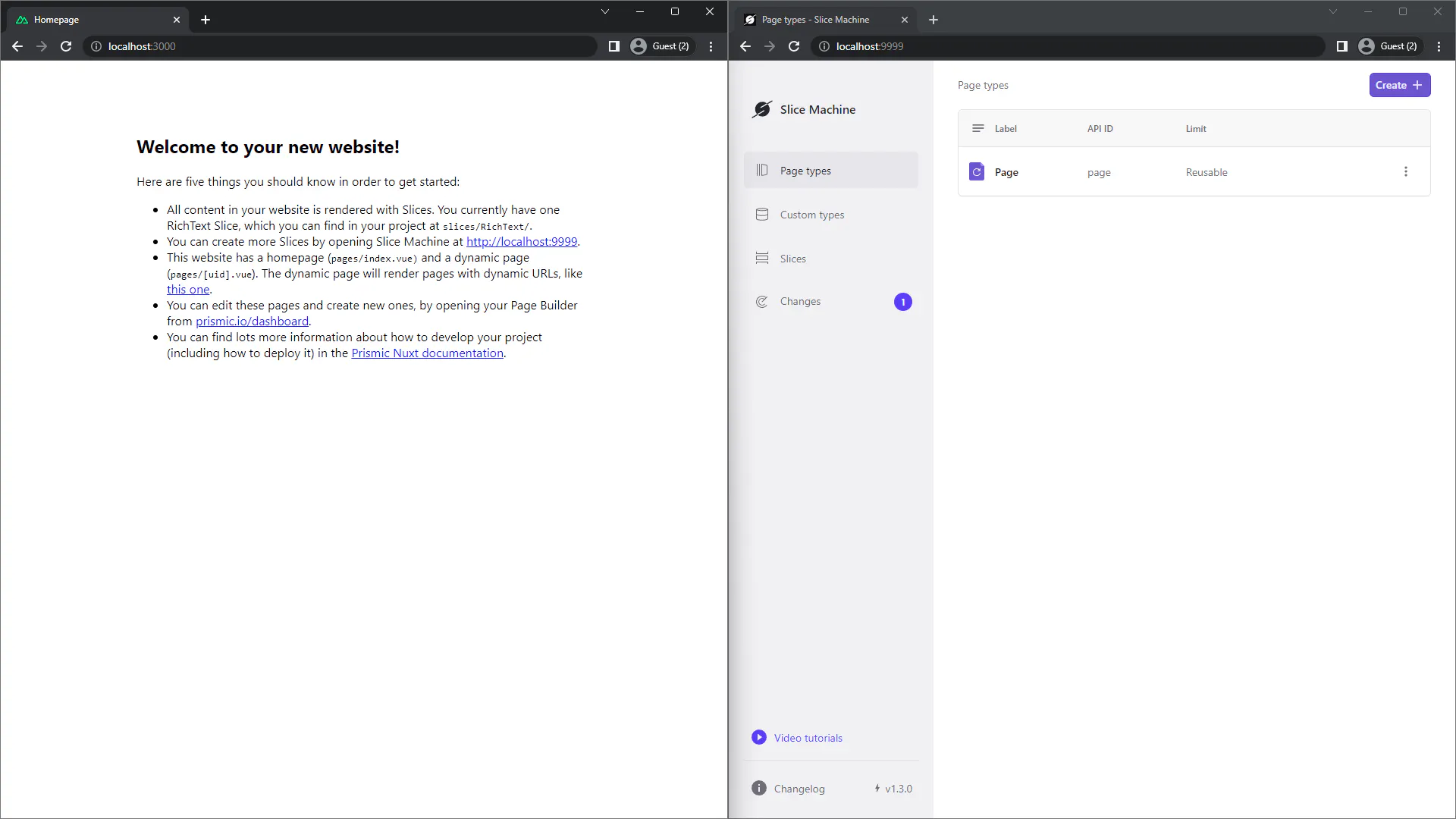
Once the servers are running, you should be able to access Nuxt on localhost:3000 and Slice Machine UI on localhost:9999.
text_content default
- content
Developing a first slice
While this post is not exactly about how to develop with slices, let’s still create a slice together to highlight some of the new things coming with Nuxt 3 and Prismic.
To do so, we head to the “Slices” page on Slice Machine, and we create a new slice, let’s name it “SimpleHero”. Inside, we can add a few fields, a title, a description, and an image. Then we can save it.

Now, if we head to our code, we can see Slice Machine created for us a new “SimpleHero” component inside our “slices” directory. It contains the minimum scaffolding for the new website section we’ll be developing.
What’s exciting here is that Slice Machine is now able to generate exact types for your slices and documents. These types play nicely with Nuxt’s TypeScript integration and allow you to template data quickly and safely with your auto-imported components, as you can see in the IntelliSense example below:

callout info
- title
[]
- content
This is all possible thanks to a third, and last, dependency installed and configured by the init command: `@nuxtjs/prismic`, our Prismic module for Nuxt. It provides you with everything you need to develop your website with Prismic.
Under its hood, it makes use of `@prismicio/vue`. It’s a Vue plugin exposing many Vue components and helpers we can make use of seamlessly inside our project now thanks to Nuxt auto-imports.
Similarly, `@prismicio/vue` also uses under its hood `@prismicio/client` to inject inside your Vue application a client instance ready to be used for querying content with Nuxt data fetching composables. That client is also all wired up and ready to preview content out of the box so that setup is kept minimal on your end.
- hidden_content
[]
text_content default
- content
Simulating slices
Heading back to Slice Machine, we can now click the “Simulate Slice” button. This will bring us to the Simulator. On this page, we can develop slices in isolation, à-la-Storybook. We can edit mock data to display through an editor, and take screenshots of our slices.

callout info
- title
[]
- content
The Simulator is a page of Slice Machine UI that makes use of the `~/pages/slice-simulator.vue` page which was created during the init process.
This page is currently used by Slice Machine to allow us to develop slices in isolation with mocked content we can edit. Soon it will also be used by our editor, letting you preview slices as you're writing them!
- hidden_content
[]
text_content default
- content
Going further
And that’s the gist of it, you’re now ready to roll with Nuxt 3 and Prismic! As this was just an intro, here are some links for things you might want to explore next:
text_content default
- content
Let’s recap
Lots of releases happened over the last few months at Prismic allowing us to offer first-class support and quick setup to Nuxt 3 users.
- Iterate on your models and develop pages and slices within Slice Machine UI to create your very own page builder
- Enjoy Nuxt 3 latest and greatest with Prismic: auto-imports for everything and comprehensive TypeScript integration with our updated SDKs: `@prismicio/vue` v4 and `@nuxtjs/prismic` v3
- Get started quickly with our updated starters and updated Slice Machine init command
We’re not stopping there as more things are to come for Nuxt and Prismic! Currently, we’re exploring opportunities to integrate Prismic within Nuxt DevTools, and it’s looking pretty promising!
In the meantime, feel free to give a start to Nuxt 3 and Prismic, following the above or directly from the UI. You can join the discussion and share your questions and feedback:
- 👨👩👧👦 On the community forum
- 💾 Or, if you stumble upon any issue or want to submit a new feature idea, we welcome you as a contributor over on GitHub.
related_posts default
- title
Related Posts
Document data
{
"title": [
{
"type": "heading1",
"text": "Nuxt 3 and Prismic: Get Up and Running Now!",
"spans": []
}
],
"image": {},
"author": {
"id": "ZO8HtREAACwARj8Q",
"type": "blog_author",
"tags": [],
"lang": "en-eu",
"slug": "lucie-haberer",
"first_publication_date": "2023-08-30T09:19:09+0000",
"last_publication_date": "2025-06-06T11:07:30+0000",
"uid": "lucie-haberer",
"link_type": "Document",
"key": "46f20387-de6b-4926-9822-27778c8ea22c",
"isBroken": false
},
"additional_author": {
"link_type": "Document"
},
"category": {
"id": "agtaYxIAACoAHp5o",
"type": "blog_category",
"tags": [],
"lang": "en-eu",
"slug": "product-news",
"first_publication_date": "2026-05-18T18:59:35+0000",
"last_publication_date": "2026-05-18T18:59:35+0000",
"uid": "product-news",
"link_type": "Document",
"key": "5b530b61-1e9f-4602-9f07-d37f39127e7b",
"isBroken": false
},
"date": "2023-07-10",
"updated_date": null,
"learning_objective": null,
"card_description": [],
"slices": [
{
"variation": "info",
"version": "sktwi1xtmkfgx8626",
"items": [],
"primary": {
"title": [
{
"type": "heading2",
"text": "This tutorial uses Slice Machine",
"spans": [],
"direction": "ltr"
}
],
"content": [
{
"type": "paragraph",
"text": "Slice Machine has been replaced by the Prismic CLI and Type Builder, and is no longer maintained. The slice concepts in this tutorial still apply, but for current setup steps, see the Nuxt docs.",
"spans": [
{
"start": 184,
"end": 193,
"type": "hyperlink",
"data": {
"link_type": "Web",
"url": "https://prismic.io/docs/nuxt",
"target": "_blank"
}
}
],
"direction": "ltr"
},
{
"type": "paragraph",
"text": "Still on Slice Machine? Migrate to the Type Builder.",
"spans": [
{
"start": 24,
"end": 51,
"type": "hyperlink",
"data": {
"link_type": "Web",
"url": "https://prismic.io/docs/slice-machine#migrate-to-the-type-builder",
"target": "_blank"
}
}
],
"direction": "ltr"
}
],
"hidden_content": []
},
"id": "callout$a3e692e3-fcfb-4d80-bfb0-91cd5f4beecd",
"slice_type": "callout",
"slice_label": null
},
{
"variation": "default",
"version": "sktwi1xtmkfgx8626",
"items": [
{}
],
"primary": {
"content": [
{
"type": "paragraph",
"text": "Nuxt is one of the frameworks we work on to offer first-class support at Prismic. From an excellent TypeScript integration and impressive performances to auto-imports and flexible rendering modes, the meta-framework for Vue.js, Nuxt 3, packs in a lot.",
"spans": []
},
{
"type": "paragraph",
"text": "Conscious of the great experience Nuxt provides you with. We, at Prismic, want to carry this it forward. Over the last few months, we released quite a lot of things toward this goal:",
"spans": []
},
{
"type": "list-item",
"text": "In April, we released Slice Machine 1.0.0 with official support for Nuxt 3 featuring a new automatic TypeScript integration",
"spans": []
},
{
"type": "list-item",
"text": "Later, in May, we released an updated Vue.js SDK, `@prismicio/vue` v4, integrating with our refreshed client",
"spans": [
{
"start": 88,
"end": 108,
"type": "hyperlink",
"data": {
"id": "ZO8IqxEAACgARkLv",
"type": "blog",
"tags": [
"Announcement"
],
"lang": "en-eu",
"slug": "prismicioclient-v7-our-new-unified-core-library",
"first_publication_date": "2023-08-30T09:19:33+0000",
"last_publication_date": "2026-06-01T14:58:56+0000",
"uid": "client-v7-new-unified-core-library",
"link_type": "Document",
"isBroken": false
}
}
]
},
{
"type": "list-item",
"text": "This was closely followed in early June by `@nuxtjs/prismic` v3 release out of RC, Prismic module for Nuxt 3",
"spans": [
{
"start": 43,
"end": 81,
"type": "hyperlink",
"data": {
"link_type": "Web",
"url": "https://twitter.com/li_hbr/status/1666067595013894145",
"target": "_blank"
}
}
]
},
{
"type": "list-item",
"text": "Finally, we made last week all our Nuxt 3 starters available for you to start working with Prismic and Nuxt 3 seamlessly",
"spans": []
},
{
"type": "paragraph",
"text": "We’re eager to show you how all of these work together and how you can quickly get started with Nuxt 3 and Prismic, so let’s get to it!",
"spans": []
},
{
"type": "paragraph",
"text": "And in case you prefer videos, we also made one about all of that; you can watch it over on YouTube →",
"spans": [
{
"start": 31,
"end": 101,
"type": "hyperlink",
"data": {
"link_type": "Web",
"url": "https://www.youtube.com/watch?v=Hk0kkMwgPgk",
"target": "_blank"
}
}
]
}
]
},
"id": "text_content$9613ea42-60cc-4074-8d40-c00f42cfc84a",
"slice_type": "text_content",
"slice_label": null
},
{
"variation": "tip",
"version": "sktwi1xtmkfgx8626",
"items": [
{}
],
"primary": {
"title": [
{
"type": "heading2",
"text": "New to Prismic?",
"spans": []
}
],
"content": [
{
"type": "paragraph",
"text": "Check out the crash course first to learn more about our key concepts →",
"spans": [
{
"start": 0,
"end": 71,
"type": "hyperlink",
"data": {
"link_type": "Web",
"url": "https://prismic.io/docs/nuxt3"
}
}
]
}
],
"hidden_content": []
},
"id": "callout$333cc64e-8230-4c93-9595-3c90d4936219",
"slice_type": "callout",
"slice_label": null
},
{
"variation": "default",
"version": "sktwi1xtmkfgx8626",
"items": [
{}
],
"primary": {
"content": [
{
"type": "heading2",
"text": "Setting up Nuxt 3 and Prismic",
"spans": []
},
{
"type": "paragraph",
"text": "To get started, we first need a project. In this case, you have three options.",
"spans": []
},
{
"type": "paragraph",
"text": "From scratch",
"spans": [
{
"start": 0,
"end": 12,
"type": "strong"
}
]
},
{
"type": "paragraph",
"text": "You can get started from scratch by creating a brand new Nuxt project using `nuxi`, the Nuxt 3 CLI.",
"spans": []
}
]
},
"id": "text_content$69b77b7c-1a82-49b7-98ab-aade00780297",
"slice_type": "text_content",
"slice_label": null
},
{
"variation": "default",
"version": "sktwi1xtmkfgx8626",
"items": [
{
"name": null,
"language": "bash",
"code": [
{
"type": "preformatted",
"text": "npx nuxi@latest init my-project\r\ncd my-project",
"spans": []
}
],
"wrap_code": false,
"category": "body_code"
}
],
"primary": {},
"id": "code_snippet$204367bb-7a04-4568-9f03-fe2c9d031470",
"slice_type": "code_snippet",
"slice_label": null
},
{
"variation": "default",
"version": "sktwi1xtmkfgx8626",
"items": [
{}
],
"primary": {
"content": [
{
"type": "paragraph",
"text": "From a starter",
"spans": [
{
"start": 0,
"end": 14,
"type": "strong"
}
]
},
{
"type": "paragraph",
"text": "We offer a few starters that can get you up and running fast with various kinds of websites. If you want a minimal starter with some example code but no extra noise, pick our new minimal starter.",
"spans": []
}
]
},
"id": "text_content$aa02b0b2-f9d3-4c65-8ac9-3dbc65426cbb",
"slice_type": "text_content",
"slice_label": null
},
{
"variation": "default",
"version": "sktwi1xtmkfgx8626",
"items": [
{
"name": null,
"language": "bash",
"code": [
{
"type": "preformatted",
"text": "npx degit prismicio-community/nuxt-starter-prismic-minimal my-project\r\ncd my-project",
"spans": []
}
],
"wrap_code": false,
"category": "body_code"
}
],
"primary": {},
"id": "code_snippet$9e1df677-d6b1-46df-857b-ddfa9f0a871d",
"slice_type": "code_snippet",
"slice_label": null
},
{
"variation": "default",
"version": "sktwi1xtmkfgx8626",
"items": [
{}
],
"primary": {
"content": [
{
"type": "paragraph",
"text": "If you prefer a more elaborate starter with a few pages, slices, and TailwindCSS already configured, then our multi-page starter is here for you.",
"spans": []
}
]
},
"id": "text_content$97cf144f-445f-44d9-94d8-bc78ecc29b11",
"slice_type": "text_content",
"slice_label": null
},
{
"variation": "default",
"version": "sktwi1xtmkfgx8626",
"items": [
{
"name": null,
"language": "bash",
"code": [
{
"type": "preformatted",
"text": "npx degit prismicio-community/nuxt-starter-prismic-multi-page my-project\r\ncd my-project",
"spans": []
}
],
"wrap_code": false,
"category": "body_code"
}
],
"primary": {},
"id": "code_snippet$e4254d3e-2b6c-42d5-9a04-629027029aac",
"slice_type": "code_snippet",
"slice_label": null
},
{
"variation": "default",
"version": "sktwi1xtmkfgx8626",
"items": [
{}
],
"primary": {
"content": [
{
"type": "paragraph",
"text": "From an existing project",
"spans": [
{
"start": 0,
"end": 24,
"type": "strong"
}
]
},
{
"type": "paragraph",
"text": "You already have a Nuxt project up and running? Great! Just get inside it and follow along.",
"spans": []
}
]
},
"id": "text_content$1bd00f4e-0c2c-4cc5-be20-5358aea98f49",
"slice_type": "text_content",
"slice_label": null
},
{
"variation": "default",
"version": "sktwi1xtmkfgx8626",
"items": [
{
"name": null,
"language": "bash",
"code": [
{
"type": "preformatted",
"text": "cd my-project",
"spans": []
}
],
"wrap_code": false,
"category": "body_code"
}
],
"primary": {},
"id": "code_snippet$cb2a1510-2beb-49a9-b5fc-f90e827fa849",
"slice_type": "code_snippet",
"slice_label": null
},
{
"variation": "default",
"version": "sktwi1xtmkfgx8626",
"items": [
{}
],
"primary": {
"content": [
{
"type": "heading2",
"text": "Initializing Prismic and Slice Machine",
"spans": []
},
{
"type": "paragraph",
"text": "Once we have our project ready at hand, it’s time to initialize Prismic and Slice Machine inside it. This is best done using Slice Machine init command with `npx` from inside our project.",
"spans": []
}
]
},
"id": "text_content$b1dabdb5-6c68-4455-a5d1-d664a275d75a",
"slice_type": "text_content",
"slice_label": null
},
{
"variation": "default",
"version": "sktwi1xtmkfgx8626",
"items": [
{
"name": null,
"language": "bash",
"code": [
{
"type": "preformatted",
"text": "npx @slicemachine/init@latest",
"spans": []
}
],
"wrap_code": false,
"category": "body_code"
}
],
"primary": {},
"id": "code_snippet$fe159d06-8827-4a45-97c0-5802c7ba335d",
"slice_type": "code_snippet",
"slice_label": null
},
{
"variation": "default",
"version": "sktwi1xtmkfgx8626",
"items": [
{}
],
"primary": {
"content": [
{
"type": "image",
"url": "https://images.prismic.io/prismic-main/YjczZGFlYjMtMDMxMS00ZmZkLTljMzktNDIzZGE2NjNkODJi_f7813346-c869-441f-959f-4919a5f7550e_init.gif?auto=compress,format&rect=0,0,1080,720&w=1080&h=720",
"alt": "An animated GIF demoing Slice Machine init process",
"copyright": null,
"dimensions": {
"width": 1080,
"height": 720
},
"id": "ZO8IxREAACwARkOJ",
"edit": {
"x": 0,
"y": 0,
"zoom": 1,
"background": "#fff"
}
},
{
"type": "paragraph",
"text": "This guided process will walk you through pairing your project to a new or existing Prismic repository, while installing and configuring Prismic and Slice Machine in the background.",
"spans": []
},
{
"type": "paragraph",
"text": "Once it’s done, you’re done! And we’re ready to start developing with Prismic and Slice Machine.",
"spans": []
},
{
"type": "paragraph",
"text": "",
"spans": []
}
]
},
"id": "text_content$426c2861-5ded-4fd2-bd6e-1f7a27fd97df",
"slice_type": "text_content",
"slice_label": null
},
{
"variation": "default",
"version": "sktwi1xtmkfgx8626",
"items": [
{}
],
"primary": {
"content": [
{
"type": "paragraph",
"text": "Two notes, however, in case you started from scratch or from an existing project (i.e. not from a starter):",
"spans": [
{
"start": 0,
"end": 107,
"type": "em"
}
]
},
{
"type": "o-list-item",
"text": "In the event you have a default `App.vue` at the root of your project. Just move it to the new pages directory: `mv App.vue pages/index.vue`, or delete it.",
"spans": [
{
"start": 0,
"end": 155,
"type": "em"
}
]
},
{
"type": "o-list-item",
"text": "Finish configuring Slice Simulator inside your `slicemachine.config.json`, by adding its URL, we’ll make use of it later.",
"spans": [
{
"start": 0,
"end": 121,
"type": "em"
},
{
"start": 19,
"end": 34,
"type": "hyperlink",
"data": {
"link_type": "Web",
"url": "https://prismic.io/docs/glossary#slice-simulator"
}
}
]
}
]
},
"id": "text_content$073ef6fd-49b3-4833-b50d-8ebd4f05ef4d",
"slice_type": "text_content",
"slice_label": null
},
{
"variation": "default",
"version": "sktwi1xtmkfgx8626",
"items": [
{
"name": null,
"language": "diff",
"code": [
{
"type": "preformatted",
"text": " {\r\n \"libraries\": [\"./slices\"],\r\n \"repositoryName\": \"my-project\",\r\n \"adapter\": \"@slicemachine/adapter-nuxt\",\r\n+ \"localSliceSimulatorURL\": \"http://localhost:3000/slice-simulator\"\r\n }",
"spans": []
}
],
"wrap_code": false,
"category": "body_code"
}
],
"primary": {},
"id": "code_snippet$0e4fcf43-19e2-4d74-b5da-ce00cb1a9ace",
"slice_type": "code_snippet",
"slice_label": null
},
{
"variation": "default",
"version": "sktwi1xtmkfgx8626",
"items": [
{}
],
"primary": {
"content": [
{
"type": "paragraph",
"text": "During this Summer, we’ll be working on automating these two extra steps for you so you won’t have to worry about them anymore in the future 🚀",
"spans": [
{
"start": 0,
"end": 143,
"type": "em"
}
]
}
]
},
"id": "text_content$ced9a0ba-7010-4843-8bd9-fd8e00161461",
"slice_type": "text_content",
"slice_label": null
},
{
"variation": "default",
"version": "sktwi1xtmkfgx8626",
"items": [
{}
],
"primary": {
"content": [
{
"type": "heading2",
"text": "Let’s get developing",
"spans": []
},
{
"type": "paragraph",
"text": "Now that our project is set up, let’s get down straight to building a first slice together. This will also be the opportunity to explain what the init command did for us and what it means to have Prismic installed on our Nuxt project!",
"spans": []
}
]
},
"id": "text_content$aec62949-8d38-4e78-be44-570e6133d59b",
"slice_type": "text_content",
"slice_label": null
},
{
"variation": "default",
"version": "sktwi1xtmkfgx8626",
"items": [
{}
],
"primary": {
"content": [
{
"type": "heading3",
"text": "Launching our project",
"spans": []
},
{
"type": "paragraph",
"text": "To run our project we want to start two things: Nuxt’s development server and Slice Machine.",
"spans": []
}
]
},
"id": "text_content$be2b14c0-e994-4b4a-8d4b-efd530bdfd4a",
"slice_type": "text_content",
"slice_label": null
},
{
"variation": "info",
"version": "sktwi1xtmkfgx8626",
"items": [
{}
],
"primary": {
"title": [],
"content": [
{
"type": "paragraph",
"text": "Slice Machine is our main developer tool. It’s a UI you run locally to manage your Prismic project, create and develop custom types and slices to build your very own page build. It is configured through a mandatory `slicemachine.config.json` file that you can find at the root of your project.",
"spans": []
},
{
"type": "paragraph",
"text": "Slice Machine was installed for us during the init command, through two extra dependencies: `slice-machine-ui` the UI itself, and `@slicemachine/adapter-nuxt`, Slice Machine’s adapter for it to work with Nuxt projects.",
"spans": []
}
],
"hidden_content": []
},
"id": "callout$f081364b-5242-490c-84c4-c1fd4a01b5a6",
"slice_type": "callout",
"slice_label": null
},
{
"variation": "default",
"version": "sktwi1xtmkfgx8626",
"items": [
{}
],
"primary": {
"content": [
{
"type": "paragraph",
"text": "If you started with a starter, you can do so with a single command thanks to `concurrently`.",
"spans": [
{
"start": 77,
"end": 91,
"type": "hyperlink",
"data": {
"link_type": "Web",
"url": "https://www.npmjs.com/package/concurrently",
"target": "_blank"
}
}
]
}
]
},
"id": "text_content$f856e3e0-9648-48b8-b4ac-d91403772352",
"slice_type": "text_content",
"slice_label": null
},
{
"variation": "default",
"version": "sktwi1xtmkfgx8626",
"items": [
{
"name": null,
"language": "bash",
"code": [
{
"type": "preformatted",
"text": "npm run dev",
"spans": []
}
],
"wrap_code": false,
"category": "body_code"
}
],
"primary": {},
"id": "code_snippet$b53fc759-d753-4906-8328-9d77fe921a90",
"slice_type": "code_snippet",
"slice_label": null
},
{
"variation": "default",
"version": "sktwi1xtmkfgx8626",
"items": [
{}
],
"primary": {
"content": [
{
"type": "paragraph",
"text": "For other cases, you’ll need to spin up two terminals, one for Nuxt, and one for Slice Machine.",
"spans": []
}
]
},
"id": "text_content$078a34df-f7e0-4cab-a5ae-7c4fbf02b14d",
"slice_type": "text_content",
"slice_label": null
},
{
"variation": "default",
"version": "sktwi1xtmkfgx8626",
"items": [
{
"name": null,
"language": "bash",
"code": [
{
"type": "preformatted",
"text": "# First terminal, Nuxt\r\nnpm run dev\r\n\r\n# Second terminal, Slice Machine\r\nnpm run slicemachine",
"spans": []
}
],
"wrap_code": false,
"category": "body_code"
}
],
"primary": {},
"id": "code_snippet$6664427e-0b13-44df-b177-223868ba60cc",
"slice_type": "code_snippet",
"slice_label": null
},
{
"variation": "default",
"version": "sktwi1xtmkfgx8626",
"items": [
{}
],
"primary": {
"content": [
{
"type": "paragraph",
"text": "Once the servers are running, you should be able to access Nuxt on localhost:3000 and Slice Machine UI on localhost:9999.",
"spans": [
{
"start": 67,
"end": 81,
"type": "hyperlink",
"data": {
"link_type": "Web",
"url": "http://localhost:3000"
}
},
{
"start": 106,
"end": 120,
"type": "hyperlink",
"data": {
"link_type": "Web",
"url": "http://localhost:9999"
}
}
]
},
{
"type": "image",
"url": "https://images.prismic.io/prismic-main/YzUwMDUxYTEtYTIwMy00NzY4LWIwNzMtNWQxYmQwNzJiYTg5_97ea2df4-4859-4649-83dc-2e87261020bd_nuxtdevserverslicemachineserver.png?auto=compress,format&rect=0,0,1920,1080&w=1920&h=1080",
"alt": "Side-by-side screenshot of Nuxt’s development server on the left, Slice Machine UI on the right.",
"copyright": null,
"dimensions": {
"width": 1920,
"height": 1080
},
"id": "ZO8IyhEAAC0ARkOe",
"edit": {
"x": 0,
"y": 0,
"zoom": 1,
"background": "transparent"
}
}
]
},
"id": "text_content$24913b8e-1f9a-4bc3-b794-1816c0d35a4c",
"slice_type": "text_content",
"slice_label": null
},
{
"variation": "default",
"version": "sktwi1xtmkfgx8626",
"items": [
{}
],
"primary": {
"content": [
{
"type": "heading3",
"text": "Developing a first slice",
"spans": []
},
{
"type": "paragraph",
"text": "While this post is not exactly about how to develop with slices, let’s still create a slice together to highlight some of the new things coming with Nuxt 3 and Prismic.",
"spans": []
},
{
"type": "paragraph",
"text": "To do so, we head to the “Slices” page on Slice Machine, and we create a new slice, let’s name it “SimpleHero”. Inside, we can add a few fields, a title, a description, and an image. Then we can save it.",
"spans": []
},
{
"type": "image",
"url": "https://images.prismic.io/prismic-main/NDMzNGFlOTQtYWY1MC00OTg2LWI1Y2YtOWM3ZTU0Njg2MmFj_3aeef49d-ef18-495e-bcd4-f5c317399669_slice.gif?auto=compress,format&rect=0,0,1080,720&w=1080&h=720",
"alt": "Animated GIF showcasing the creation of a “SimpleHero” slice with a title, a description, and an image, inside Slice Machine UI",
"copyright": null,
"dimensions": {
"width": 1080,
"height": 720
},
"id": "ZO8IuxEAACwARkNa",
"edit": {
"x": 0,
"y": 0,
"zoom": 1,
"background": "#fff"
}
},
{
"type": "paragraph",
"text": "Now, if we head to our code, we can see Slice Machine created for us a new “SimpleHero” component inside our “slices” directory. It contains the minimum scaffolding for the new website section we’ll be developing.",
"spans": []
},
{
"type": "paragraph",
"text": "What’s exciting here is that Slice Machine is now able to generate exact types for your slices and documents. These types play nicely with Nuxt’s TypeScript integration and allow you to template data quickly and safely with your auto-imported components, as you can see in the IntelliSense example below:",
"spans": []
},
{
"type": "image",
"url": "https://images.prismic.io/prismic-main/YTVmNmM2ZGMtYjNjNi00ZmY2LWFhMzAtOWVjMTAzYmY0YTFl_409bf4ab-8f20-4088-bbf8-374582b2274b_typescript.gif?auto=compress,format&rect=0,0,1080,720&w=1080&h=720",
"alt": "Animated GIF showcasing the templating of a “SimpleHero” slice on VS Code. TypeScript IntelliSense reports available data precisely and components are auto-imported.",
"copyright": null,
"dimensions": {
"width": 1080,
"height": 720
},
"id": "ZO8IvREAACoARkNj",
"edit": {
"x": 0,
"y": 0,
"zoom": 1,
"background": "#fff"
}
}
]
},
"id": "text_content$957e34b1-1cf9-4555-a2cf-0136f7acc84c",
"slice_type": "text_content",
"slice_label": null
},
{
"variation": "info",
"version": "sktwi1xtmkfgx8626",
"items": [
{}
],
"primary": {
"title": [],
"content": [
{
"type": "paragraph",
"text": "This is all possible thanks to a third, and last, dependency installed and configured by the init command: `@nuxtjs/prismic`, our Prismic module for Nuxt. It provides you with everything you need to develop your website with Prismic.",
"spans": [
{
"start": 130,
"end": 153,
"type": "hyperlink",
"data": {
"link_type": "Web",
"url": "https://prismic.nuxtjs.org/"
}
}
]
},
{
"type": "paragraph",
"text": "Under its hood, it makes use of `@prismicio/vue`. It’s a Vue plugin exposing many Vue components and helpers we can make use of seamlessly inside our project now thanks to Nuxt auto-imports.",
"spans": [
{
"start": 32,
"end": 48,
"type": "hyperlink",
"data": {
"link_type": "Web",
"url": "https://prismic.io/docs/technical-reference/prismicio-vue"
}
},
{
"start": 57,
"end": 67,
"type": "hyperlink",
"data": {
"link_type": "Web",
"url": "https://vuejs.org/guide/reusability/plugins.html"
}
},
{
"start": 172,
"end": 189,
"type": "hyperlink",
"data": {
"link_type": "Web",
"url": "https://nuxt.com/docs/guide/concepts/auto-imports"
}
}
]
},
{
"type": "paragraph",
"text": "Similarly, `@prismicio/vue` also uses under its hood `@prismicio/client` to inject inside your Vue application a client instance ready to be used for querying content with Nuxt data fetching composables. That client is also all wired up and ready to preview content out of the box so that setup is kept minimal on your end.",
"spans": [
{
"start": 53,
"end": 72,
"type": "hyperlink",
"data": {
"link_type": "Web",
"url": "https://prismic.io/docs/technical-reference/prismicio-client"
}
},
{
"start": 172,
"end": 202,
"type": "hyperlink",
"data": {
"link_type": "Web",
"url": "https://prismic.io/docs/nuxt-3-fetch-data"
}
}
]
}
],
"hidden_content": []
},
"id": "callout$f58ec5dc-9818-422d-ab28-7974303f87b7",
"slice_type": "callout",
"slice_label": null
},
{
"variation": "default",
"version": "sktwi1xtmkfgx8626",
"items": [
{}
],
"primary": {
"content": [
{
"type": "heading3",
"text": "Simulating slices",
"spans": []
},
{
"type": "paragraph",
"text": "Heading back to Slice Machine, we can now click the “Simulate Slice” button. This will bring us to the Simulator. On this page, we can develop slices in isolation, à-la-Storybook. We can edit mock data to display through an editor, and take screenshots of our slices.",
"spans": []
},
{
"type": "image",
"url": "https://images.prismic.io/prismic-main/MTZhNTIxMDctM2VmNS00ZGZhLThhZmEtZmQ1N2QzYmRhMjE1_7f11f3a2-f4a4-4e1d-a948-e1deb83524d5_simulator.gif?auto=compress,format&rect=0,0,1080,720&w=1080&h=720",
"alt": "Animated gif showcasing the usage of the simulator to edit mock content and take a screenshot from a slice.",
"copyright": null,
"dimensions": {
"width": 1080,
"height": 720
},
"id": "ZO8IwxEAACoARkN9",
"edit": {
"x": 0,
"y": 0,
"zoom": 1,
"background": "#fff"
}
}
]
},
"id": "text_content$a4c9b3fb-0cf4-4a9e-8f56-95f92be73621",
"slice_type": "text_content",
"slice_label": null
},
{
"variation": "info",
"version": "sktwi1xtmkfgx8626",
"items": [
{}
],
"primary": {
"title": [],
"content": [
{
"type": "paragraph",
"text": "The Simulator is a page of Slice Machine UI that makes use of the `~/pages/slice-simulator.vue` page which was created during the init process.",
"spans": []
},
{
"type": "paragraph",
"text": "This page is currently used by Slice Machine to allow us to develop slices in isolation with mocked content we can edit. Soon it will also be used by our editor, letting you preview slices as you're writing them!",
"spans": [
{
"start": 121,
"end": 212,
"type": "hyperlink",
"data": {
"id": "ZO8IqxEAACgARkMV",
"type": "blog",
"tags": [
"Announcement"
],
"lang": "en-eu",
"slug": "the-future-of-website-content-creation-is-visual-and-real-time",
"first_publication_date": "2023-08-30T09:19:33+0000",
"last_publication_date": "2026-06-01T14:58:56+0000",
"uid": "the-future-of-website-content-creation",
"link_type": "Document",
"isBroken": false
}
}
]
}
],
"hidden_content": []
},
"id": "callout$91f239c8-0acf-4309-9282-aed763efbb0e",
"slice_type": "callout",
"slice_label": null
},
{
"variation": "default",
"version": "sktwi1xtmkfgx8626",
"items": [
{}
],
"primary": {
"content": [
{
"type": "heading3",
"text": "Going further",
"spans": []
},
{
"type": "paragraph",
"text": "And that’s the gist of it, you’re now ready to roll with Nuxt 3 and Prismic! As this was just an intro, here are some links for things you might want to explore next:",
"spans": []
},
{
"type": "list-item",
"text": "Fetch Prismic data on your pages and components →",
"spans": [
{
"start": 0,
"end": 49,
"type": "hyperlink",
"data": {
"link_type": "Web",
"url": "https://prismic.io/docs/nuxt-3-fetch-data"
}
}
]
},
{
"type": "list-item",
"text": "Template any kind of content with components and helpers →",
"spans": [
{
"start": 0,
"end": 58,
"type": "hyperlink",
"data": {
"link_type": "Web",
"url": "https://prismic.io/docs/nuxt-3-template-content"
}
}
]
},
{
"type": "list-item",
"text": "Route documents to correct pages using the Route Resolver →",
"spans": [
{
"start": 0,
"end": 59,
"type": "hyperlink",
"data": {
"link_type": "Web",
"url": "https://prismic.io/docs/nuxt-3-define-routes"
}
}
]
}
]
},
"id": "text_content$8faac21e-caf7-4eed-9ef9-830e678702aa",
"slice_type": "text_content",
"slice_label": null
},
{
"variation": "default",
"version": "sktwi1xtmkfgx8626",
"items": [
{}
],
"primary": {
"content": [
{
"type": "heading2",
"text": "Let’s recap",
"spans": []
},
{
"type": "paragraph",
"text": "Lots of releases happened over the last few months at Prismic allowing us to offer first-class support and quick setup to Nuxt 3 users.",
"spans": []
},
{
"type": "list-item",
"text": "Iterate on your models and develop pages and slices within Slice Machine UI to create your very own page builder",
"spans": []
},
{
"type": "list-item",
"text": "Enjoy Nuxt 3 latest and greatest with Prismic: auto-imports for everything and comprehensive TypeScript integration with our updated SDKs: `@prismicio/vue` v4 and `@nuxtjs/prismic` v3",
"spans": [
{
"start": 139,
"end": 158,
"type": "hyperlink",
"data": {
"link_type": "Web",
"url": "https://prismic.io/docs/technical-reference/prismicio-vue?version=v4"
}
},
{
"start": 163,
"end": 183,
"type": "hyperlink",
"data": {
"link_type": "Web",
"url": "https://prismic.nuxtjs.org/"
}
}
]
},
{
"type": "list-item",
"text": "Get started quickly with our updated starters and updated Slice Machine init command",
"spans": []
},
{
"type": "paragraph",
"text": "We’re not stopping there as more things are to come for Nuxt and Prismic! Currently, we’re exploring opportunities to integrate Prismic within Nuxt DevTools, and it’s looking pretty promising!",
"spans": [
{
"start": 143,
"end": 156,
"type": "hyperlink",
"data": {
"link_type": "Web",
"url": "https://devtools.nuxtjs.org/",
"target": "_blank"
}
}
]
},
{
"type": "paragraph",
"text": "In the meantime, feel free to give a start to Nuxt 3 and Prismic, following the above or directly from the UI. You can join the discussion and share your questions and feedback:",
"spans": [
{
"start": 89,
"end": 109,
"type": "hyperlink",
"data": {
"link_type": "Web",
"url": "https://prismic.io/dashboard/new-repository?framework=nuxt"
}
}
]
},
{
"type": "list-item",
"text": "👨👩👧👦 On the community forum",
"spans": [
{
"start": 15,
"end": 34,
"type": "hyperlink",
"data": {
"link_type": "Web",
"url": "https://community.prismic.io/c/developing-with-prismic/10"
}
}
]
},
{
"type": "list-item",
"text": "💾 Or, if you stumble upon any issue or want to submit a new feature idea, we welcome you as a contributor over on GitHub.",
"spans": [
{
"start": 75,
"end": 121,
"type": "hyperlink",
"data": {
"link_type": "Web",
"url": "https://github.com/nuxt-modules/prismic/issues/new/choose"
}
}
]
}
]
},
"id": "text_content$dc4b9e5f-326c-4806-b47e-62bac5295344",
"slice_type": "text_content",
"slice_label": null
},
{
"variation": "default",
"version": "sktwi1xtmkfgx8626",
"items": [
{
"related": {
"id": "ZO8IqxEAACgARkLv",
"type": "blog",
"tags": [
"Announcement"
],
"lang": "en-eu",
"slug": "prismicioclient-v7-our-new-unified-core-library",
"first_publication_date": "2023-08-30T09:19:33+0000",
"last_publication_date": "2026-06-01T14:58:56+0000",
"uid": "client-v7-new-unified-core-library",
"link_type": "Document",
"key": "8bd5d35a-4903-4469-bb29-c05f380179ed",
"isBroken": false
}
}
],
"primary": {
"title": [
{
"type": "heading2",
"text": "Related Posts",
"spans": []
}
]
},
"id": "related_posts$db542466-9355-421f-99d8-17fd76856985",
"slice_type": "related_posts",
"slice_label": null
}
],
"meta_title": "Nuxt 3 and Prismic: Get Up and Running Now!",
"meta_description": "Learn how to get started with Nuxt 3 and Prismic and enjoy a comprehensive development experience when building your very own page builder.",
"social_image": {},
"short_name": null,
"part_of_guide": {
"link_type": "Document"
}
}